iOS Today 802 Transcript
Please be advised that this transcript is AI-generated and may not be word-for-word. Time codes refer to the approximate times in the ad-free version of the show.
Mikah Sargent [00:00:00]:
Coming up on iOS today, the point five updates are here. Rosemary Orchard and I cover what you should know about iOS 26.5 and more. Stay tuned.
Rosemary Orchard [00:00:14]:
Podcasts you love from people you trust.
Mikah Sargent [00:00:18]:
This is twit. This is iOS Today, episode 802 with Rosemary Orchard and me, Micah Sargent. Recorded Tuesday, May 12, 2020 for Thursday, May 14, 2026. What's new in iOS 26.5? Hello, and welcome to iOS Today. If you're listening to this, do not adjust your dials. My voice is a little off, so I'll just get that out of the way forthwith and want to introduce you all, welcome you all, I mean, to the show today. Of course, this is the show where we Talk all things iOS, iPadOS, WatchOS, HomePod, OS and more. It's funny how I still try to sing even now.
Mikah Sargent [00:01:03]:
I am one of your hosts, Micah
Rosemary Orchard [00:01:04]:
Sargent, and I am Rosemary Orchard. And if I sound slightly off, that's because I'm also under the weather. Micah and I have got viruses, but that's okay. We still take pride in what we do, and therefore we're here to bring the show to you.
Mikah Sargent [00:01:18]:
Oh, very, very good. In fact, yes, we this week are Talking about the 0.5 updates of iOS and iPadOS and some of the new features that you can expect if you have yet to download the updates. These are. They're not super packed or anything like that. It's not an update that's going to really call out to you and make you go, I've got to get this, I think. But there are a few things that you should know about, and I think it starts with security, with the latest versions of iOS and iPadOS. Apple, of course, has put out its typical guides that cover the security content of these pages, and it's a lot of text, frankly. But the point is that there are some different parts of iOS 26.5 and iPadOS 26.5 that have security issues.
Mikah Sargent [00:02:27]:
In fact, we can mention a few. So for different accounts, there are some apps that have in the past had the ability to bypass certain privacy preferences, and so that has been addressed. Another place is with audio, where there was an issue where processing an audio stream in a special kind of media file would cause the process to terminate. So it couldn't do much harm, but it was enough that it was obviously something that need be updated, because these often are sort of the first step to bigger issues. There's another fix about the system that provides files between different devices and so being able to make use of this security issue an app would be able to access sensitive user data without needing to do the validation that is involved there. So really, I think fascinating stuff and well worth looking at the document that has all of the changes. I like too that there are some things like in shortcuts where if the shortcut ran, then an app could access user sensitive data. And so in that case, Apple simply added an additional prompt for user consent to make sure that they knew that this was happening and sort of allowed it to happen as opposed to happening without your permission.
Mikah Sargent [00:04:07]:
So yeah, go through if, if you're needing a reason to update, go through and look at this guide and it will make you go, oh, wow, they fixed a lot.
Rosemary Orchard [00:04:19]:
Yeah, yeah. Though to be fair, if you are not, you know, an expert at these things, I wouldn't be surprised if you. There, go. Like a buffer overflow was addressed. Wait, what does that mean? Like, some of these things are just kind of like, whoa, I don't get it. What did stand out to me is that a lot of the issues that were there caused unexpected app termination. You know, like a malicious file, an attacker doing something, it might cause an unexpected app termination, which actually means that the app was pretty much handling things the right way. It just looked really bad to the end user.
Rosemary Orchard [00:04:54]:
You know, if you tried to open a really bad file in preview or for a quick look, Sorry, it was quick, look, it would just crash, which is actually pretty good. You know, like, ideally it would just be like, no, no, no, you can't. But as a fallback, if something can't go, this is a malicious file, I don't want you looking at that because that's a really bad idea crashing. I would say it's a pretty good safety mechanism as a backup system. So, yeah, so, you know, some of these things were, you know, just, you know, they were, they were still working. They just looked bad to the user and so now they look better. But it's always worth when Apple comes out with updates, just thinking, how many security updates are there in there? Because I know that there are some people who are still not using the latest iOS because of liquid glass. I'm sorry to say I don't think liquor glass is going anywhere anytime soon, but it is going to probably improve.
Rosemary Orchard [00:05:51]:
And let's face it, if you file feedback about something, it's like leaving a review on a coffee shop that you've never been to. If you haven't actually used it yourself, you may find that you adapt to it more readily than you think. I certainly got used to it fairly Quickly, despite the fact it was not my favorite in the first beta after wwdc.
Mikah Sargent [00:06:09]:
Yeah, I'm with you there. I. You get used to it and then it's fine. But it did take me some time and I think that, you know, ultimately changes are troublesome at times and that it just took a, it took a little while to go, okay, this is, this is how things are. And you know, then I started to appreciate perhaps where I had not before, some of those features. Right. That I thought at the time, I don't know, I went, oh yeah, actually this does look better. Or I do enjoy this.
Mikah Sargent [00:06:46]:
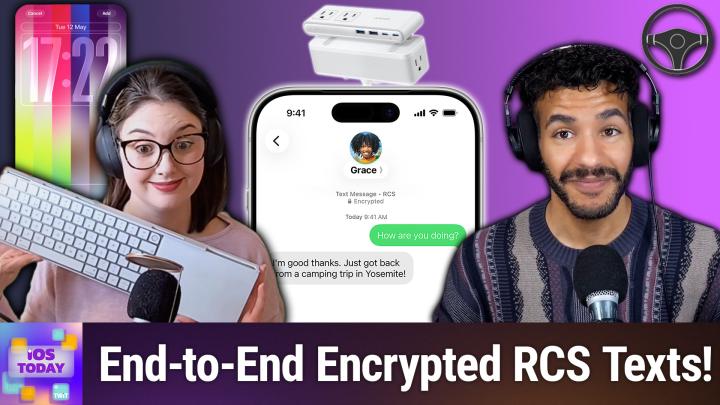
So take some time with that and kind of dig into it and see what makes sense for you with those adjustments that you can make to liquid glass. Moving along, I think we can talk about some of the fun stuff, right? The security updates are sort of the secret reason that it's well worth updating. And I remember working, working with Rene Richie at Imore and him often joking that Apple would, would work to make sure that there were like new emoji or some other interesting thing in the updates to get people to do it for the sake of actually getting those security updates. That is the system that's important, right? That's what we want. And so going, okay, for the average user, as you said, reading through and reading about buffer overflows and things like that, going, I don't know, a race condition, what. But having this actually be something that you want to get, what is new? Well, Apple puts one thing ahead of all else in its press release and I think that that's because this has long been a loud request from people whose voices tend to be louder online. It's end to end encrypted RCS messaging. And if you're going what? Well, let's kind of pull back for a moment and talk about how on iOS, for the longest time you've known about the blue bubble versus green bubble situation, where when you were messaging someone who did not have access to imessage servers, you would be doing green bubble texting, meaning that it was using the carrier's SMS or in some cases RCS messaging to send text or images.
Mikah Sargent [00:08:55]:
And we've all talked plenty about how troublesome that can be when you're talking to an Android friend and you don't know how the message is going to show up, if all of it's going to get there, et cetera, et cetera, et cetera. But that of course has changed. And now with Apple's support of RCS messaging, first and foremost it did result in much better communication between green between non imessage and imessage devices. And you know, I can speak to having a few people who use Android and being able to see their typing indicators, being able to see that the message is delivered, knowing that the photos will show up as I expect them to. All of that came together in RCS messaging, but what we didn't have was what imessage and other messaging services would provide, which is end to end encryption. What that means is that both sides of the conversation are encrypted and so when you are communicating with another person it is encrypted as it sends out and then it is encrypted the whole time and then sort of decrypted on the local device to display the message. So that at no point during that exchange when it's going through Apple servers is Apple able to even see what a message is, what the actual text of a message is. With RCS messaging that's a little bit different because this does go through a carrier and so carriers need to be able to enable, need to not be able to, but need to enable this feature for end users so that you can then make use of it.
Mikah Sargent [00:10:51]:
And it's just a more protected, more safe form of communication in terms of your privacy and your security because people aren't able to see those messages without the keys. And the keys are essentially the device or account that is accessing those messages. Did I miss anything with that Rosemary? With the RCS messaging? I think we got it all.
Rosemary Orchard [00:11:19]:
Yeah, yeah I think we did. It's one of those things where RCS messaging, it's definitely a thing between Android devices and it seems to be more of a thing in the US because I've got to say everybody else I know everywhere else just uses WhatsApp. So yeah, it's useful that it's there and it's coming in and it should exist especially for places that like to send you a message to say like we are going to call you at 9:15 or whatever it is. But yeah, overall for my day to day life it's not going to make that much of a difference. But that doesn't mean it shouldn't exist.
Mikah Sargent [00:11:52]:
Agreed, agreed. Moving along, the next update is the introduction of new wallpapers. This typically happens around Apple's collections and so we see during February the introduction of the Unity Watch band and Unity Watch face. Well the same thing applies around June, excuse me, which is Pride month, where Apple will release new wallpapers. And in this case these are The Pride Lumina wallpapers. These wallpapers are part of the updates and available for use there and essentially are a series of sort of striped colors. And they're pretty neat. There's a lot that you can do with it, a lot of customization, which I think is fun, right?
Rosemary Orchard [00:12:52]:
Yes. Yeah, there really is. So I've got it here. So if you tap and hold on your home screen, then you can customize or add a home screen. And I've chosen to add one and it's giving me the option of Pride. So the. The two leftmost ones here on my screen are the new ones. If you scroll across, you can see the Pride ones from the previous years.
Rosemary Orchard [00:13:10]:
If I just tap on the first one, I can swipe through to choose the different options from the various different Pride flags. So, you know, we've got all of these which do look absolutely beautiful. I really like the way that they've put the colors in. And you can also customize it to just one color if that suits you more. So, for example, I could focus in on purples for me, or. Sorry, that's three colors. Sorry. I can actually remove one of the purples there.
Rosemary Orchard [00:13:37]:
I'm going to just switch back to one of these. You've got your widgets, you've got the ability to change the size and style of your date and time, plus, of course, all the other options there. And, yeah, I mean, I do like this. I wish they had named the Pride flags that are part of this, instead of it just being the numbers in Roman numerals, because that is slightly difficult to decipher. But as it is, I. Yeah, these are really gorgeous. I really love them. They exist on the iPad as well as the iPhone.
Rosemary Orchard [00:14:08]:
And, yeah, you should definitely have a play and try them out because we're getting to that time of year where it's summery, there's lots of Pride parades and, you know, events going on, and it's always nice to show that you are a friendly person to people, especially if they're looking for a safe space.
Mikah Sargent [00:14:24]:
We did mention already that iOS 26.5 has new wallpaper options. It's a full kind of kit of customizations that you can do as well as a bunch of security updates. And the same applies to Apple's other platforms as well. In fact, some of these platforms, that is the extent of the updates that you will see on those devices. But when it comes to iOS and iPados, there's a little bit more. Now. Now we're seeing that when you are using reminders on iPad OS 26.5. If you snooze a reminder that's due, there are now better options that have times on when the reminder will pop back up.
Mikah Sargent [00:15:18]:
So it's a lot like third party apps. The third party app due that I use, for example, this now features a better way of not just saying hey, I need you to remind me later, but to do so with a little bit more kind of understanding when that's going to happen.
Rosemary Orchard [00:15:37]:
Yeah, I had a reminder that was due at 7pm the other day and before iOS 26.5. If I snooze that, I would have had the option for in an hour, in three hours and tomorrow morning. Well, what is tomorrow morning? Tomorrow morning is an ambiguous statement, right? We don't know. Is that 6:00am, is that 9:00am, is that 11:00am? All of those are tomorrow morning. Now it says tomorrow morning 9am and this just removes the ambiguity completely. And so I was able to snooze the reminder for the next morning and get my thing done, which is great. So I personally think that this is really lovely. I'd love the option to be able to tweak those times to suit me a little more.
Rosemary Orchard [00:16:15]:
But you can always go in and edit the time of your reminder from a notification anyway, so you get reminded at a more appropriate time if you can't do something now. But it's a very good start.
Mikah Sargent [00:16:26]:
There are also other changes as well which include in iOS and iPadOS 26 some changes to Apple Maps. Well, upcoming new features in Apple Maps there's a suggested places feature which will kind of give you places that are interesting based on popularity and then also based on your recent searches. So it's a little bit of, it's almost like, you know, playlist generation in, in Apple Music or photo surfacing in the photos app. This is a suggested places feature that will tell you, hey, you know, you've been here and here, you might like this place. And I think that's kind of fun. I have found it fun seeing the suggestions that Apple provides me via TVOs. And I have over time begun to enjoy the music recommendations provided by Apple Music. And so it's kind of cool seeing the smarts that can go into these other categories as well based on behavior.
Mikah Sargent [00:17:48]:
And I know that for some people that can be a little bit too privacy invading. But I personally have always trusted Apple's choices on privacy and security and weighing the good and the bad there and knowing that so much of this is encrypted, et cetera, Et cetera, et cetera. And so yeah, I think this is a really cool feature personally.
Rosemary Orchard [00:18:17]:
It is and it's one of those things where a lot of people trash Apple's recommendations and things. Like when you first get a new iPhone, it's so slow. That's because it's going through and it's re identifying all the people and your pet and pets and things like that in your photos. So your recommendations being trash because across different platforms it's recommending this versus over here it's recommending that instead. That's because it they tend to pretty much keep everything locally on a device if at all possible. So yeah, I'm pretty excited to see the suggested places. This is coming hand in hand with the future feature idea of ads in maps, which I'm not sure I love but we'll see because you know there's plenty of map apps out there and it's not like I really trust Google with my data. They've you know, been doing all sorts of things with it for years.
Rosemary Orchard [00:19:06]:
So I'm gonna stick with that Apple for now and see what happens.
Mikah Sargent [00:19:10]:
And then we also have, and this is a little bit more complicated, it's technically a developer sided change. Could you tell us a little bit about the updates that developers can expect when it comes to subscriptions and how that is translated for the end user?
Rosemary Orchard [00:19:38]:
Yes. So at the moment or previously Apple offered two subscription options essentially. So you could have like a monthly subscription or a yearly subscription. And what would be very common is if you pay for the yearly subscription there would be, it would be cheaper, right, than paying for a whole year. But the problem is some people might be like yes, I want a whole year, but they wouldn't necessarily have the money to pay for the whole year right now, but they were willing to commit for a whole year. So now what Apple is offering to allow developers to do is an annual subscription with monthly payments. Which means that you can pay over 12 months for an annual subscription, but you're locked in. So if you decide in month three actually I'm going to cancel this.
Rosemary Orchard [00:20:20]:
You've still got to pay nine more months and this gets shown to you in settings and so on. But it's something I wanted to highlight here because having been on the other side of it, having many friends on the other side of it, I'm very aware that when people sign up for subscriptions it feels very much like cool. So I can just cancel at any time and so on and so forth. And I didn't want people to Feel like they're getting caught out. So this is an additional subscription option that basically just divides the annual payment into 12 payments. You can see in settings, it'll tell you if you've made payment 1 of 12, payment 3 of 12, payment 11 of 12, for example. But it is a really nice option to allow people to commit for the year without having to pay for the year right now. Because, yes, that, that does make it difficult.
Rosemary Orchard [00:21:08]:
It's also good for the developer because it means that they've got regular money coming in instead of chunk of cash, nothing, nothing, nothing, Nothing, nothing for 11 months. Woo. Chunk of cash, nothing for 11 months. So it gives them a more stable income, which can be really useful for them, especially when it comes to, you know, figuring out what features and so on are going to come next. They know that they've got a regular amount of money coming in instead of predicted, and then reality may be falling short of those predictions.
Mikah Sargent [00:21:36]:
Indeed. I love this change for developers. I think this is a great change. I imagine it's going to be a little confusing for end users, but again, growing pains. And I think, more importantly, actually, I take that back. I think that consumers are have long gotten the hang of buy now, pay later services, and I've seen many people use those with perfect success. And so in that way, I think that this change is good to give developers the ability to offer a longer subscription and maybe in that way make the cost a little bit less. Because there have been times where I thought I could roll this over to yearly, but it's just right over.
Mikah Sargent [00:22:31]:
But I'm okay with committing to, you know, paying for this for the next year. It's just, you know, a matter of like, oh, this is the fourth app that I then am going to pay X amount for a yearly subscription. And that's.
Rosemary Orchard [00:22:48]:
That just started when the four $90 subscriptions come out of your bank account in the same month at the same month, it suddenly feels like a lot of money going in on subscriptions. And if you can spread that cost over a year, if it's still the $90 just divided by 12, it doesn't feel quite as bad, you know. So, yeah, there's advantages and disadvantages to everything, but it's really great that it's an option that developers can now offer to all the lovely users of their apps.
Mikah Sargent [00:23:15]:
Absolutely. All right, moving along here with iOS and iPados 26 point, we also have the ability to. Well, now I've lost my place. We also have an update for people who communicate with their little robots if you have made use of chatbot sort of Voice communication from OpenAI, from Anthropic, from Google's Gemini, then you may have desired to be able to talk to your little robot in, in your car. And Apple originally did not allow for this level of communication. Apple has traditionally been pretty protective of the functionality available via CarPlay because I think this is one of the places where we do still see Apple, what is the term, nanny state? It's a little bit in the. In the overprotective area, arguably, but for me, I love it. I think it's great.
Mikah Sargent [00:24:32]:
But for some people, they feel a little bit controlled, which is that CarPlay is genuinely designed to keep you from focusing too much on the console in your vehicle. And Apple has developed the feature set and the UI and the ux, all based around limiting your visual interactions with that screen. And so messages are. If you tap on a message conversation, it doesn't pop up the whole messages and you can read through them. No, it says them out loud to you. You are interacting that way. And so I know that the limitations that have been there have always been a part of that. So to see chatbots come into CarPlay, for people who do want to have that back and forth, this is now more of a possibility.
Mikah Sargent [00:25:36]:
Rosemary, did you have more to say there?
Rosemary Orchard [00:25:39]:
Yeah, I want to just say that Apple is walking a fairly fine line when it comes to CarPlay. They have iPhones in pretty much every country in the world, I think. I know there are some in the. In Antarctica for sure. So I feel like they've definitely got every continent. But it's one of those things where every place in the world has got different legislation as to what is legally allowed in vehicles and not. And so Apple has to be quite. They're walking a really tight line of what is allowed and where.
Rosemary Orchard [00:26:08]:
Where do we then have to start? Geofencing features so if you drive across the border between the US and Canada, do half of your CarPlay apps disappear? Do they just stop functioning? What happens here? If something's legal in one place, it's not in another. I know US states have got different laws with regards to device handling whilst operating a moving vehicle, things like that. It all gets very confusing. So I'm quite glad that they tend to take a more defensive approach here. I would much rather they put the development time into things like crash detection that allow me to play Tetris on the incarceration console of my vehicle because, you know, one of those could save my life. One of those could potentially cause A huge amount of harm to other people. Um, so, yeah, it. This is exciting.
Rosemary Orchard [00:26:48]:
There have been times, especially if I'm sitting there and I'm stuck in traffic and I'm there, like, trying to figure out a problem, usually when I'm commuting to work because I. I drive into the office every once in a while and I'm sitting there and I'm in traffic waiting to try and get to the car park and I have an idea and I just want somebody to bounce that idea off. So, you know, ChatGPT or Copilot or something like that could be really useful for this. So it's great to see that chatbots can be available in CarPlay and hopefully the makers of those will be reasonable as to what is allowed so they're not going to suddenly start trying to provide you with images coming back to you.
Mikah Sargent [00:27:25]:
The other day I wanted to. I don't really use OpenAI much. I'm. I mostly use Claude, but I was in the car and wanted to use it for something because I do tend to have ideas in the vehicle and it was actually a terrible experience. It didn't work, it didn't hear what I was saying. It stopped. And so there are definitely some things that need to be ironed out. But I'm not surprised given that, again, this has just now been allowed more recently.
Mikah Sargent [00:28:05]:
So hopefully we'll see some updates there. And remember, folks, that when you have issues, you got to tell somebody about them or else they don't know that changes need to take place. So, yeah, as you're going through your chatbot interactions, when you come up against issues, maybe you also ask your chatbot to take down a note for later so you can send some feedback. Another change that's happening that I'm glad to see happen is something that you've been able to do on macOS for a while, and that's if you get a magic keyboard or a magic mouse or magic trackpad. Those are Apple's branding for its Bluetooth wireless keyboard, trackpad and mouse. When you get those, you plug in the charging cable, plug it into your Mac, and it will pair those devices so that you don't have to go through the Bluetooth pairing process and perhaps run into some issues there. And in some cases it's required as part of the. Well, it's one way of making sure that authentication can take place between a touch id, magic keyboard and a Mac.
Mikah Sargent [00:29:18]:
In any case, this has long been a feature for macOS. Apple has now introduced it for ipados. So if you have ipados 26.5. You can make use of this feature that again gives you the ability to simply plug the charging cable into your peripheral, plug it into the iPad, and then it will automatically pair those two for Apple's magic devices. Again, you know, good, good, good update there. But not something that's, that's life changing by any means. And let's see, I keep wanting to sing we are. Oh yeah, yeah.
Mikah Sargent [00:30:09]:
Can you tell us what is, what's the change in the eu?
Rosemary Orchard [00:30:15]:
I know you're not part of the eu, but. But no, but I'm EU adjacent geographically at least. I wish I was still part of the eu. Anyway, politics aside, the EU has added some legislation at various points and so iPhone users in the EU are now going to be getting AirPods, like pairing and notification forwarding for third party wearables. So this would be, for example, if you've got like a Fitbit type thing or a smartwatch that isn't an Apple watch, or you buy some headphones from say, Anker Soundcore. Now I'm using these as examples. These ones, these, these devices don't necessarily have these features yet, but essentially things like when you bring your AirPods close to an iPhone for the first time and you open it up, it'll say, hey, would you like to pair these AirPods? And you go, yes, please. That's going to be a feature.
Rosemary Orchard [00:31:05]:
Being able to get notifications pushed from your iPhone phone onto another smartwatch of some kind. That's going to be something. And similarly, live activities like your Domino's pizza delivery, because everybody needs to keep track of exactly where their Domino's pizza delivery is at all times. You will be able to get those displayed on third party wearable. Now this does very much depend on whether or not said third party adds support to it. Like, you know, if you're thinking, oh, I can dig out my old Fitbit from 2010 and I'll be able to get all my iPhone notifications on that. That probably not Fitbit, for example, has changed a lot in the last 15 years, 16 years now. But you know, there will be new devices that come along that will be able to take advantage of these features.
Rosemary Orchard [00:31:52]:
So yeah, hopefully some of these things will actually make a difference for folks and maybe some of it will even end up coming back to core iOS which will be available around the world for everyone. But essentially it's part of trying to make everything fair across the platforms and so on and so forth. So we'll have to see what happens with other features Coming in the future.
Mikah Sargent [00:32:16]:
Absolutely. There are, as I mentioned, as we've mentioned, many sort of sort of under the under the radar features that have been added that are or rather updates that are all about making sure that you are secure and good to go as far as Apple knows for now. And so there aren't a whole lot of changes on this. We're not surprised to see this arguably because WWDC is just around the corner and it tends to be that Apple kind of sort of wraps up things, puts a bow on it, the operating system as it switches focus to the new version. And we hear that Apple's next software updates are for the most part going to be focused on making sure that there's stability in the platform with just a few new updates. Mostly this allegedly more helpful Siri, which we are are expecting. But that seems to be the kind of big marquee feature with just making sure that the bugs are squashed outside of that. So yeah, I don't imagine we'll see too much more change in the 26 release of iOS, iPadOS, et cetera.
Mikah Sargent [00:33:52]:
But now's the time to go in and get those updated because there are at least those features. You can expect that if you've got automatic updates turned on. Those features will be installed over the coming weeks. It's hard to nail down exactly when automatic updates happen versus when the folks who go and seek out the update make it happen. Obviously for them it's when they do it, but if it is an automatic update, companies tend to let the seekers update first and then perhaps find bad things that they didn't catch. And then from there, at that point we see it roll out into the, you know, the update takes place. So it will be soon if it hasn't happened yet for you. But if you want to, you can of course go into your settings and head into software updates to make those changes.
Mikah Sargent [00:35:01]:
Very exciting stuff. Would love to hear from you on your favorite or the, you know, most excited about feature that has come out. And if there's not anything that you have seen as far as, you know, these 0.5 updates go, perhaps you can tell us what exactly. Alex. Alex says first one up the hill gets the arrows. Yes. So after you, after you. In any case, let us know what you're excited about for WWDC if you would like.
Mikah Sargent [00:35:36]:
All righty folks. Oh, iOS Today TV moving right along to the news. Rose, do you want to share with us what you have in the news this this week?
Rosemary Orchard [00:35:47]:
Yes, this completely slid under my radar. And then Stephen Hackett posted about it over at 512 pixels. Claris Apple's dog Cow can walk. Now, a little bit of context. Apple has a developer app which they update for every big event that they're having that's anything vaguely related to developers and throughout the year. And it's a great way if you're curious about various WWDC features and so on too, do watch the videos for for that. So it's a free app from Apple that you can download. One of the things it does is it adds some stickers into imessage because they do WWDC themed stickers.
Rosemary Orchard [00:36:25]:
And so here there are some pretty cool ones. There's 50 with the the O or the 0 being an apple and it's rainbow and the the rainbow transitions. And then there's also Clara, Apple's dog cow, which for the first time ever has four legs and is walking. I don't know how I feel about this. It looks a little weird but there's a WWDC 26 license plate, there's some eyes blinking in a curious manner and hello as a very shiny holographic sticker. So it, you know, feel free to go and download the Apple Developer app, have a poke around and use the stickers if you want to or don't if you're not a sticker person. I need to use stickers more. I confess when I tried to send Micro sticker earlier because I was going to get the stickers up to show everyone I couldn't find the developer stickers, I was like, oh, I need to open the developer app from within messages.
Rosemary Orchard [00:37:16]:
No, if you tap on the plus next to the messages then you'll see stickers and then you can swipe between all of the apps that provide stickers across the top, which of which there are many, including fantastical. But the Apple Developer app is also right there. So don't forget to check out the stickers. And yeah, tell us what you're most excited about potentially seeing it in WWDC 2026 for iOS and iPados too.
Mikah Sargent [00:37:42]:
All righty. And now it is time for us to talk about our app caps. This is the part of the show where we share the apps or gadgets that we're using now or have been using for some time that we think are great and want you all all to know about. I recently I in our living room we have a little area, it's a, you know, side table that had for a long time a charging station on it but it was a very old sort of clunky charging station with ports that were old enough that when our, you know, when someone would come over and plug in their device to charge, charge, it would take forever. And so they wouldn't get really a good charge in any short period of time. And it was also very ugly. It took up a lot of space. It was black, which for a sort of techy office is fine, but in the living room where it's softer, not as fine.
Mikah Sargent [00:38:47]:
So I needed to find a new sort of charging station. And lo and behold, Anchor comes forth with a great option. Now the page has a black version and a white version, so obviously went with the white version here because the table that it is connected to is also white. So it really blends in. Now Anchor is very clever and comes up with these new innovations for, for things that we have long seen and just sort of accepted that they are the way that they are. And one of those is power strips, also commonly referred to as surge protectors. But I don't like to call them that because not all of them are surge protectors. In this case, this is a surge protector as well.
Mikah Sargent [00:39:41]:
But essentially how this works, and I don't have it, I can't show it to you in my hands because it is in use in the living room, but we've got that web page that can show it. It essentially clamps to the side of a table and it has a part that goes on top of the desk or table and then the part that goes underneath it with rubberized pads and a little sort of turn wheel that you use to fasten it. And it has on top two spots for AC power and then on the top of it facing forward. And this is important, this is key. Two USB A ports and two USB C ports. So because they're facing forward, you can plug some cables into those and have them all available right there. And then if someone's got like a unique thing or they happen to bring their own adapter, or if I have something that doesn't know plug in and charge the normal way, I've got those two AC plugs right there at the top. Excuse me.
Mikah Sargent [00:40:53]:
And then it also has AC plugs that run down underneath the table as well. So it's just, it's just a very clever design that made me go, wow, I love when Anker comes up with these ideas and makes it it so that you can just keep it, keep it all together and do it in a way that is low profile and doesn't feel super, super high tech and kind of ugly, which is the way of things usually. So, yeah, it was just a nice kind of quality of life update where it was sparked by again, guests coming over and plugging in and then we'd be talking and then 30 minutes would go by and then they'd unplug the device and it had barely charged. I'm going, oh, right. Because this was in the before times, the charging station. You don't update those very often. It was very old. So, yeah, this was a really cool product to see and I was very happy to.
Mikah Sargent [00:42:07]:
To come across it. Good work to anchor on the stuff that they come up with. And just like being willing to take a risk I think is kind of nice because, yeah, it's not all going to. It's not all going to be everybody's choice, right. But the people who need something like this can get something like this, and I think that's what makes this stuff really, really handy. It is 70 bucks, but bear in mind that it is a 1500 Joule surge protector. It has built in two USB, a two USB C 70 watt max charging and six AC outlets. So quite a bit packed into this thing at 70 bucks.
Mikah Sargent [00:42:57]:
And yeah, I think it's really nifty. And it's funny because this company's come up with lots of other options and those were fine, but it just wasn't right. And then this came along and I said, this is exactly what I've been looking for. So it was a perfect addition to our home. Rosemary, what is your AppCap pick this week?
Rosemary Orchard [00:43:27]:
Well, my AppCap pick is an app and it's a free app. I was curious. We have a border collie. Border collies are known for hurting, like, you know, chasing after sheep, putting things back in their places and so on. But they're not colorblind. Dogs generally aren't, but their vision is very different to humans. So I was curious, how good is a dog's vision? So I downloaded the great free app, Dog Vision. Now, this has a couple of different options.
Rosemary Orchard [00:43:57]:
So to start with, there are there. There's two, three different versions of the view through the camera. Do you want split screen where you can see the original and dogvision next to each other? Do you want just the original, which maybe there's no point to that. I personally haven't found a use for it or just dog vision. And then underneath this, you can actually change what kind of vision you're looking for because it turns out that generally dogs get grouped into three different categories. So there's a horizon scanner, which is sighthounds. So You've got like your greyhounds and lurchers and things like that, whippets, salukis, which I had to Google and found out they're quite cute. Then you've got your close range specialists.
Rosemary Orchard [00:44:40]:
So those are the dogs with the flat faces. So we're talking like Jack Russell's pugs, French bulldogs. And then you've got your battle balanced generalist, which is the vast majority of dogs. So you've got things like your Labrador, your German shepherd, your beagle. And you know, a border collie is a kind of shepherd dog. So that's the one I selected. And then I dug out something quite bright here. So I'm gonna switch this over to split screen.
Rosemary Orchard [00:45:03]:
So these are some nail art stickers, funnily enough, for doing nail art. So it's all kinds of pretty pinks and blues, but we've got some oranges and yellows up in the top corner we've got blacks, we've got some greeny turquoises and so on. And as you can see the dog view, like there's a little bit of color going on there, but it's mostly just a sort of grayscale yellow. Even my desk mat, which is purple. You know, you can see what's going on there, but you have to get pretty close as a dog to be able to like make the shapes out. Things blur pretty quickly and I just thought this was really interesting to be able to see how a dog sneeze because, you know, they do tend to explore the world through their nose, noses and tongues. And now I see why, literally. But yeah, of course this does not affect my love for our border collie in any way, shape or form.
Rosemary Orchard [00:45:53]:
In fact, now when he completely misses something on the floor, I'm significantly more sympathetic than I was the first time around. And I, I point out him where it is so that he can find it with his nose and then crunch up whatever it is that he is after. But yeah, this is really cool and I really love it. It, I will just show people briefly the same thing using the horizon scanner. And as you can see, those poor greyhounds and whippets don't stand a chance with these nail stickers and the, the flat faced ones, they're, they're doing okay, but like you can see the perspective is really off. It's like wearing the fake beer goggles for seeing what it's like when you're drunk. So yeah, I'm, I'm really glad that we have a generalist dog dog. But yeah, I thought this was really cool.
Rosemary Orchard [00:46:37]:
I don't know how accurate it is. I can't transform myself into a dog to verify it, but I, it's pretty cool either way.
Mikah Sargent [00:46:44]:
Yeah, it certainly gives you a level of empathy. You know, I'm, I have at this point senior dogs and not only do they already have dog vision as you're showing, but on top of that, as any animal ages, it also is impacted, eyesight is impacted and many of them get the. Because there's not a lot of people think that when their dog's eyes start to cloud that it means that they have. Oh goodness, now I'm forgetting what it's called when the lens is sort of milky white, but I can't think of the term. Anyway, it's not the full on. Oh, cataract. Yeah, it's not full on cataracts, but is instead just what's called like lenticular something. Regardless, it is, it does affect their sight.
Mikah Sargent [00:47:42]:
But what my vet was saying is that it's such a gradual change that they really do adapt to that over time, but it will have impact on their low light vision. And so shadows can seem kind of weird to them and other things can be a little off, especially as the sun is going down and shadows grow longer. And so she said you might start to see some behavior changes that a lot of people go, oh no, my dog's getting older and it's sort of going senile and it ends up being that it's just a change in vision, not a change in mental capability. And so anything that can kind of give you some insight into a being that you, you love, we hope that you otherwise don't have access to, you know, you can't communicate with it and ask what it's seeing or feeling or whatever. And so yeah, I love whenever there's just an opportunity to sort of have an external amount or an external tool for empathy that you might not otherwise get is, is a nice thing. So if you don't have the dog vision app and you've got a dog, you should absolutely go get this app. Really, really neat stuff, folks, that is going to bring us to the end of this episode of iOS today. I want to thank you all for tuning in to the show and for being here with us.
Mikah Sargent [00:49:12]:
If you would like, you can email us Iostodayut TV with your thoughts, your suggestions. We'll have Shortcuts Corner on next week's episode. And so also for your shortcuts requests, Rosemary Orchard. If people would like to follow you online and check out all the great work you're doing, where should they go to do so?
Rosemary Orchard [00:49:30]:
The best place to go is rosemaryorchard.com, which has got links to all the podcast, books and everything else I'm involved in, plus my social media sites. But there is no link to my Discord handle because you can find me through Club Twit. Micah, where can FOX find you?
Mikah Sargent [00:49:43]:
If you're looking to follow me online, I'm ikasargent on many a social media network. Or you can head to Chihuahua Coffee, that's C H I H where I've got links to the places I'm most active online. Thank you so much for being here. We'll catch you again next week for another episode of iOS today. Bye bye.