iOS Today 778 Transcript
Please be advised this transcript is AI-generated and may not be word for word. Time codes refer to the approximate times in the ad-supported version of the show.
Mikah Sargent [00:00:00]:
Coming up on iOS today, Rosemary Orchard and I, Micah Sargent, talk about tracking your nutrition. Stay tuned.
Rosemary Orchard [00:00:10]:
Podcasts you love from people you trust.
Mikah Sargent [00:00:14]:
This is twit. This is iOS Today, episode 778 with Rosemary Orchard and me, Micah Sargent. Recorded Tuesday, October 28th, 2025 for Thursday, November 13th, 202025 Nutrition Tracking. Hello, and welcome to iOS Today. This is the show where we talk all things iOS, iPados, WatchOS, HomePod, OS and all the OSes Apple has to offer you. We love to help you make the most of your devices by talking about the apps, the gadgets, the gizmos, the services, the settings, whatever it happens to be so that you can take advantage of what we have to offer. I am one of your hosts. My name is Micah Sargent.
Rosemary Orchard [00:01:02]:
And my name is Rosemary Orchard. And I'm very happy to be here because I've been doing a lot of cooking recently. Micah and I kind of want to put that somewhere, you know, so I can track it maybe in some kind of cool way.
Mikah Sargent [00:01:16]:
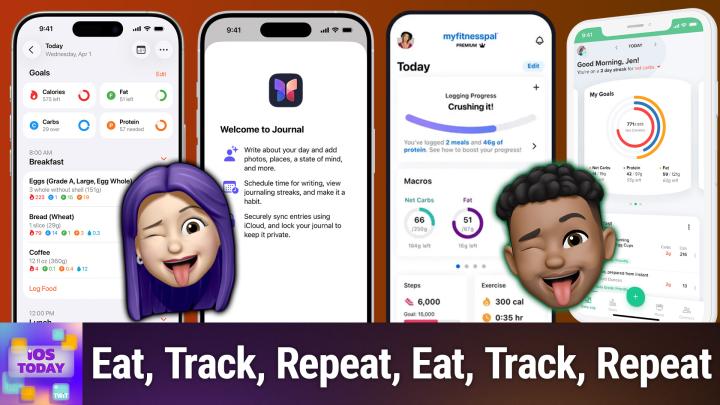
Wow. I wonder if we can figure something out. Indeed we can. I thought that today would be a great or this would be a great opportunity to talk about different nutrition apps, and I want to be clear about what we aim to talk about. There are different reasons why someone might want to track their food intake, and I, at various times have done so mostly out of curiosity. But what always ended up happening for me is realizing all of the extra stuff that you get with food when you eat it, you know, we think about those. What do they call the macros, you know, your proteins, your carbohydrates. And what's the third category? It's escaping me at the moment, but.
Mikah Sargent [00:02:04]:
Oh, fats. And I can remember, you know, knowing about those. Right? But it's the other stuff, the vitamins, the minerals, whatever else might be part of your consumption that you don't necessarily realize. And having that information, it didn't always mean that it was something that I, you know, that I was able to act on or that it was super beneficial to my knowledge. But as a person who's just a curious person, I always that that was kind of fun just knowing, oh, you've had this much more selenium today than you had yesterday because you ate a bunch of Brazil nuts. Although apparently there is an cap on how many Brazil nuts you're supposed to eat before you could get selenium poisoning. So just be, be careful. Regardless, I think it's really fun to kind of have that information.
Mikah Sargent [00:02:53]:
And again, there may be more important reasons why you are tracking your nutrition. But there are lots of apps out there that are available. One app that has become a darling for me and many in this space is an app called foodnoms. That's food N O m s And that is because Food Noms, the nutrition tracker, is an app that lets you log your food, track your macros, your fats, your carbohydrates and your proteins. But it does so in a way that protects and respects your privacy, which is something that you're not going to get from some of the other apps. It is able to keep track of your nutrition in the same way that you'd be used to with other apps. You can scan barcodes, you can check a library of content so you can search for what you're looking for. And I love that.
Mikah Sargent [00:03:55]:
On top of tracking proteins, carbs and fat, it also lets you track things like fiber, which Americans in particular, we are not good at getting our daily intake of fiber. You are able to also use the your phone to do a nutrition label scan and so you can easily have that added as well. You can keep track of cholesterol, of water intake, caffeine intake, alcohol intake, and then use that information to create charts that kind of give you even more. It's also got a widget or widgets built in so that you are able to set it up and here is kind of what you get. By default, for the free version, you can do unlimited food tracking. So all of your food, all in the app. You can create goals for calories and macros. You can create recipes and meals within the app.
Mikah Sargent [00:04:55]:
And it also by default integrates with the health app, which I think is a lot of fun and part of the reason why I like to track things. And then you also get notifications and the ability to export as CSV. Kevin. Yes, Kevin has just said in the chat that we all wish we lived in an area with more fiber, but of course we're talking about fiber Internet. I happen to be in a place, I happen to have fiber Internet where I am. And yes, you do all wish you could have it because it's great. Um, then there's the plus version which lets you log drinks. With it, you can track your water and some of the other features like caffeine and alcohol.
Mikah Sargent [00:05:38]:
You are also able to save items as favorites and import nutrition data from health to the app. So I just wanted to kind of give you an understanding of what it is like to pay for it. But even without paying for it, you get a whole heck of a lot just by default, if you're looking for an easy to use and privacy respecting nutrition tracker, that's where foodnoms comes into play as your option. The in app purchase is $39.99 a year. So 40 bucks a year gets you those extra features. Now there's one that I want to mention because it is very well known and because it is very well known, it has a huge database. And I think that that's an important aspect of why you might want to use it. But it is not as privacy respecting as food noms.
Mikah Sargent [00:06:36]:
And I think food noms ends up kind of being that alternate option that is going to, you know, not try to use the information that you have logged about your nutrition as a means of making money off of you. But MyFitnessPal is another option. Now MyFitnessPal, well known, has existed for a long time, I believe was just an online, was just a site that you could use a long time ago before it became an app. But it is essentially your kind of all in one food and nutrition tracker. It has built in meal planning. It is very powerful in terms of tracking your, your main stuff, your, you know, your macros, but also all of the small little bits of nutrition that you might want to know. That stuff that I said is kind of exciting with it. You can also use it for free.
Mikah Sargent [00:07:33]:
The in app purchase is double the cost of food knobs at $80 a year. Why might you want to use MyFitnessPal instead of Food Noms? A couple of reasons that that might be more important to you when you're kind of weighing the differences. One is the huge food data because so many people use it. You're going to get a database that is not just populated from kind of government sources like the fda, but I think that actually comes from the agriculture. But regardless, it's not just populated by that, but it's also populated by individuals who over time have done the work for you, have typed in a lot of this stuff. That does mean that you do need to keep an eye on things because occasionally it'll get it wrong but, but in many ways it gets it right and does it quickly, which is really handy when it comes to just, you know, popping in what you need to know. Plus MyFitnessPal. Another reason why you might wanna use MyFitnessPal is the chances that it has more integrations with other services that you might use is higher as it's been around for longer and is used by more people and therefore has a larger development budget and therefore can afford to integrate with some of the more fringe apps and services out there.
Mikah Sargent [00:08:53]:
So if you use some sort of other thing to log your nutrition or your actions, your activity, then this could be something that would work with it so that they can kind of communicate with each other. You're keeping track of your calorie burn along with your calorie intake, which is what this does. Are you ready to grow in 2026? Let me tell you why advertising on Twit is the way to make that happen. I'm Micah Sargent. I'm the host of Tech News Weekly and several other shows on the network. And if you've ever listened to our shows, then you know what makes what we do different. It's trust. When we introduce a new partner on the show, the audience knows we believe in what they offer because we're only taking on partners that will actually benefit our audience.
Mikah Sargent [00:09:39]:
And they know that when I'm waxing ecstatic about your product or service, they I'm doing so with authenticity. Some other reasons why you should join the network? It's all about the numbers. 88%. That's the number of listeners who've made a purchase based on a twit ad. 90%. Those are the people who are involved in their company's tech and IT decisions. Oh, and by the way, 99% is the number of people who listen to most or all of the episode. Every host read ad we offer is authentic.
Mikah Sargent [00:10:09]:
It's unique, it's embedded permanently. So that means that your brand is going to get exposure even after your campaign concludes. Because yes, our nerds, our listeners, our viewers, they go back and check out the stuff we've done in the past. Every ad is simulcast across our social platforms. It's always available in both audio and video formats. So if you want your brand woven into conversations with tech experts and the world's most tech savvy audience, I mean, where else are you going to turn except right here at TWIT? So let's make 2026 your most substantial reach yet. Get in touch with us. Email partnerWIT TV or visit TWiT TV advertise the last app that I want to mention here is an app that I used.
Mikah Sargent [00:10:58]:
I went to a nutritionist. This has been a couple of years ago. I was having some blood sugar issues that it was we, I guess discovered or posited that my insulin sensitivity sensitivity was down. And there was some research to suggest that one could improve their insulin sensitivity by by using the Keto diet as a means of kind of rewiring Things. This, this is not me recommending or suggesting any diet to anyone. To be clear, I am solely talking about my experience. I was and I still am. I've mentioned this before, a person who just, I, I like food and I do like to eat.
Mikah Sargent [00:11:59]:
Eat. What I don't like is having to feed myself to stay alive. The idea that I have to constantly figure out what to eat and to make that happen and to remember and all of those aspects of it, I'm bad at that. And so I often go intermittent fast without realizing it and I often choose low effort, repeatable meals. And so I was just doing, I didn't realize that this was not great, just solely rice and beans. Rice and beans, rice and beans, rice and beans, rice and beans. Over and over and over and over again thinking that I was getting all the necessary stuff. But point is, nutritionist was like, well this could be causing some issues because these are in many ways not complex carbs.
Mikah Sargent [00:12:56]:
And so let's try this. So anyway, my point is I did the keto diet and it actually did, it ended up helping me. But I wanted to mention an app that I used during that time. I don't have to be keto anymore, but did what it needed to do and now I can eat, you know, in a, in a more standard way. But the app was called Carb Manager and Carb Manager is an app that is made for people who are attempting to go into ketosis and for tracking that. And so if that's something that is part of your reality and you are attempting to try the keto diet, I think Leo did it for a while as, as a person with diabetes was, was keto for a few years, or maybe it was a year, I don't recall. But for me this app was very helpful in keeping track of that. And it's the, the biggest reason is its whole purpose is where other apps are going to focus on protein as your top option, this is going to focus on fat as your top option and carbs as like your least important because you want to have as few carbs as possible.
Mikah Sargent [00:14:12]:
That's the whole point. It forces your body to burn fat as a means of fuel instead of burning carbs as a means of fuel. And so this app was very good at doing that. It also had some built in options and then the user database was filled with a lot of the keto foods that you might not get from MyFitnessPal. So that's available also for free within that purchase of 39.99 per year, same as Food. Oh, and then the other thing I forgot to mention is that it worked well with Apple Health, such that I was able to pull in my workouts. And that, of course, would then affect the overall read from the app of how many, you know, calories you'd taken in that day. What else is.
Mikah Sargent [00:15:07]:
What else was going on? So, yeah, all around really interesting and helpful app when it came to that. That's all from me. Rosemary, I think you've got something interesting to share. Yeah.
Rosemary Orchard [00:15:26]:
So I have been exploring the use of the Journal app recently and I've been using it for a whole bunch of things like checking haircuts I've had, because I know there are apps out there. Sorry, I know that apps out there, like when did I last? And things like that to tell you when you had a haircut, but particularly somebody with longer hair. I had a haircut. It's not a short back and sides. It's not a number four on top, number two on the sides. I don't know what the blade numbers mean. I'm guessing it's like, who knows? It could be magic. I'm guessing it is.
Rosemary Orchard [00:15:57]:
So, you know, it's not something where I can just go in, produce a word salad and get the same thing every time. I need actual pictures to show the hair stylist if there's something in particular that I really liked about it last time, or even if there was something I didn't like, but I basically want almost the same thing. But I would like it with that one little thing tweaked. So I've been experimenting with Journal for a whole bunch of things. And instead of posting food to Instagram, I'm expo. I'm experimenting with posting food to Journal because I'm not posting food for external validation. I eat meals. I like food.
Rosemary Orchard [00:16:32]:
Food is delicious. Food is good for you. People should eat food. People should also drink drinks. And you know what? Guess what? Just because it's got a little flavor and it does not make it bad for you, it's still good. It still has water. Drink it. It's good.
Rosemary Orchard [00:16:45]:
So I have been experimenting in particular with adding baking is my next thing that I'm going to be doing to adding to journal. So I bake sourdough bread. I have a very happy starter called Bready Mercury. You're all welcome for that room there. There we go. At least Mike is happy. I'm always happy. So, yeah, Bready Mercury is a very happy and active starter and works very, very well and produces some amazing lips.
Rosemary Orchard [00:17:14]:
Something I tried this week, which I'd never tried before, was freezing the dough because I did not have time to bake it before I left. And I knew I wanted fresh bread when I got back. And so but I was like, do I, do I bake in the freeze it or freeze it and then bake it? I went for the freeze and then bake it. There was a little issue with getting it out of the banneton, which is like the basket that it sits into shape before it gets baked. But once I got it out of there, it went really, really well. So I've got a couple of photos of it here. I've noted the recipe that I use 500 grams of flour. I specifically use a bread flour.
Rosemary Orchard [00:17:46]:
So I'm going to actually edit this and I'm going to change that to say extra strong white bread flour, 150 grams of starch, 300 grams of water, 10 grams of salt. And I've added a couple of notes. It tasted great. Use fresh out of the oven to admit cool time before making a baking sandwich. Still good the next day to eat with soup because that is today. And the great thing about this is when you add a journal entry. So I'm just gonna select and I'll just reuse the same picture of the bacon sandwich. I can then change the entry date.
Rosemary Orchard [00:18:20]:
And this is really good because the thing that I love about journal, it's simple, it's free, it's created by Apple, so you don't need to worry about your data going off to other servers or whatever. I can say, hey, do I want the entry, the date on this journal entry to be now, when I created it or whenever I create it, or do I want it to be the date from the photo? And I'm just going to select photo. It just does it for me. It's really simple. It's great. So it means I can go back, date a whole bunch of things based on photos I've already taken and it just ends up there. Now I don't have to add any more information. I can just be like, cool, I'm done.
Rosemary Orchard [00:18:55]:
That's my journal entry. It's a picture of a bacon sandwich. It was a good bacon sandwich, I should say. But yeah, you can have multiple journals in journal, you can search. You can even add tags to things if you want to or sorry, you can bookmark things. Yeah, there's a whole bunch you can add photos you can use. I believe this is image playground. You can add a location to it, you can add voice notes, you can Add mindfulness information and yeah, there's all sorts you can do.
Rosemary Orchard [00:19:30]:
I think it's just a really great way for anything that you are, you know, wanting to keep track of. Oh, I made this meal and it was delicious. Next time I do it, I'd like to add this to it. So, yes, you could stick a post it note digital as well through Safari extensions or physical on a recipe to do that again. Or you could just stick it in journal and add some photos and sort of memorialize it in a way that you can then share it with other people later. Because, yeah, that's for me, part of the fun. I don't have to share this with people, but I could export this and send it to somebody if I wanted to. You know, somebody wants this particular recipe for sourdough, then yeah, I'd recommend it.
Mikah Sargent [00:20:13]:
I love that. All right. As I always say, if you have apps that you think we should add to the list, you can always email us and let us know. It's iOS today with TV. That's how you get in touch. Moving along to the news. It's time for the news next. This is a great, I think a great bit of news.
Mikah Sargent [00:20:44]:
If it ends up being the case. Well, I mean we know it's the case in this case. It's not a rumor. So let me refresh that. In this case, I'm excited to say, not a rumor. Nine to five, Mac has sort of written a piece explaining a new feature in iOS 26.1 which will come out that talks about how third party apps will be able to do a little bit more when it comes to photo backup. So as things stand, third party apps, you've probably experienced this before. If you've ever used a third party app, if you've ever used Dropbox, if you've ever used Google Photos, if you've used Amazon's photo storage solution, if you've used any of those, my Leo previous sponsor, they all will tell you, hey, please keep this app in the foreground.
Mikah Sargent [00:21:44]:
And also wouldn't hurt, you know, just it'd be kind of nice if you also plugged in the phone while I am uploading these photos. And that is because Apple did not allow these third party photo apps to in the background, AKA while you were doing other things, while you were in other apps, keep uploading photos. And there are many reasons for that. Up to this point, it's mostly been about performance and battery Life. But in iOS 26.1, which is in beta right now, Apple has changed things and there is Some new documentation from Apple that says that develop developers who make these photo apps will be able to give users this feature of being able to upload photos in the background. So interestingly, it is a new framework that is part of the Photokit or it's a new extension of the framework, which is the Photokit framework that already exists on iOS and and here's 9to5Mac quoting Apple in iOS 26.1 and later. Photokit provides a new background resource upload extension type that enables photo apps to provide seamless cloud backup experiences. The system manages uploads on your app's behalf and processes them in the background even when people switch to other apps or lock their devices.
Mikah Sargent [00:23:23]:
The system calls your extension when it's time to process uploads and it automatically handles network connectivity, power management and timing to provide reliable processing. So that means that Dropbox, once this feature is enabled and once Dropbox, you know, hops on it and again Google Photos and others I'm just using Dropbox as an example, will no longer have to tell you, keep the app open please. And instead you can do other things. You can also put your phone away and it's going to upload those photos in the background. That is a fantastic change that will make it so that you don't have to keep doing things only when the app is open. It has a lot of other information as well, including how a developer makes use of the feature. And it does require some user consent, so that's something to be mindful of. Of course, things could change a little bit over time, depending on how it goes from beta to release, but I'm celebrating this change.
Mikah Sargent [00:24:30]:
I think that it's a great new option for me. Who I don't, I don't. When I'm using Dropbox, it's almost exclusively on the Mac and so I don't often open the Photos app on my phone or excuse me, the Dropbox app on my phone, which then triggers the upload. And the same thing applies. I like to use Google Photos to print photos because it has a built in print feature. And so I will go to the Google Photos site again on my Mac and it doesn't have all of my Photos in it because I haven't opened the Google Photos app in a million d billion years on my phone. And so knowing that they could just do that in the background is really nice. So I'm looking forward to that change.
Mikah Sargent [00:25:13]:
If you like what you heard and you want more of this week's top stories in tech, well, subscribe To Tech News Weekly. Every Thursday, I talk with the journalists making and breaking the tech news. All right, we have a bit of feedback and so we will head there next. This feedback comes in from Scott. Scott writes Micah. Hey, that's me. I just heard you describing the tech woven iPhone case on the podcast, and I also have it for my iPhone 17 Pro. It reminds me a lot of this unusual denim case that Google sold for the Pixel 3a.
Mikah Sargent [00:25:47]:
I had one for work a while back as a test unit. Here's a picture of what it looks like. It has a very similar feel to the touch it. Have you ever seen one of these? I love the show. Hi, Rosemary Scott. Aha. So this again, we believe is from the Google Pixel 3a. It's a sort of gray, one might call it charcoal.
Mikah Sargent [00:26:09]:
Right. Sort of heathered gray material and very pretty, very woven. It does look like it probably got a lot more dirty because it looks very fabricy. Whereas if you look at the case for the tech woven, it as much as it is a textile, there's not. I mentioned this before. It's not high pile at all. And it doesn't. It doesn't look like it's a fabric that is sort of lifted from the case, whereas you can kind of look at that.
Mikah Sargent [00:26:44]:
And it reminds me a little bit of the alcantara of Windows laptops and, excuse me, of Microsoft laptops. And so, yeah, I did not have a Pixel 3a. I've seen that case before for sure, and it is a little reminiscent of it. Yes. But, Scott, I hope you're happy with your new case. And I'm of course going to be keeping an eye on this thing. I think I mentioned before, I do the D and D event every year for St. Jude Children's Research Hospital to raise money for them.
Mikah Sargent [00:27:22]:
And part of what I do is I pretend to be one of the characters that my players talk to. That character happens to be a celestial being with light blue skin. And so I use like stage makeup to paint my face and sort of upper body and then also my hands, because all of that is on display. And so light blue makeup was getting on the case. Despite the amount of setting powder and barrier spray I used this year, still some of it was rubbing off and I was able to clean it off just fine. There's no more blue left on this thing. And that's what I was worried about. I was worried that it was going to end up staying on there and it has not so very happy with the state of things as far as that goes.
Mikah Sargent [00:28:11]:
So Scott, let us know how your case is treating you. I'll be keeping an eye on that as well. All righty from that, let's go. Oh, and I've got a suggestion from Rosemary on some help for making sure that makeup stays where it's supposed to and doesn't come off. Rosemary, tell us about your app cap for this week as we round out the show.
Rosemary Orchard [00:28:36]:
Yeah, so I have been struggling a little bit with the power adapter provided with my work laptop recently. It does not provide enough power for my work laptop and if I plug in basically anything, I then get a message from a Windows machine saying, hey, you're not providing enough power so things might not work very well. To which my response is, well, that's not good. Now at home I have a dock so that that problem is pretty much mitigated and I've juggled around. I have a lot of chargers. One might say that this is a bit of a problem. Personally, I think I prefer to think of this as a solution based system rather than a problem. And so when I spotted the Ugreen 100 watt charger with a built in cable plus three ports on Amazon on sale the other day, I sort of had to go for it.
Rosemary Orchard [00:29:27]:
Now I have the UK version, I put a link in the show notes to the American version. So obviously I have this chunky, great big UK plug on it. Unfortunately, the only thing I don't like about this is the prongs don't fold. But aside from that, this is great because it has a built in cable which it's not super long, it's like maybe a meter, but it does pull retractable. Yeah, it retracts in and then it has a little magnet in it. So there's a little snap where it pops back and it sticks down. So it's not just gonna randomly flap about in your bag. You know, I can shake this and that's not going anywhere.
Rosemary Orchard [00:30:04]:
And then on top of that it's got another two USBC ports and a USB A port because USB A is not dead. I have a number of devices which I charge with USB A to USB C because they are not created with good hardware. So therefore if you try to plug them in with USB C, they'll just go and die. And yes, that facial expression is indeed included with these devices in some cases because they will just sort of go and I'm dead and I'm never going to work again, which is not great. Don't recommend that. So yeah, this is a really great charger. It's currently on sale in the US for I want to say 45. But we are coming up to that time of year where there are sales and discounts on many, many things.
Rosemary Orchard [00:30:46]:
So keep an eye out because you know, sales and discounts are always great and Ugreen is a good company. I would rank them up there with Anchor, to be honest, as far as creating these things go. So yeah, it's a small travel charger but it is great for just the. Yeah, no, I just, I like, I don't, I'm traveling or something. I don't want to throw a bunch extra cables into my bag just in case. I just need, you know, I just want to be able to pull out one extra cable when I need it to charge my phone as well or something like that. And you've just got that extra cable and I, I do really like that. I also got the retractable USBC cable to plug into my car and that's amazing because now I have a 100 watt USBC cable in my car and I could just be like and plug my ebook reader in my handbag when I inevitably go to leave the house and discover that my ebook reader is not as charged as I thought it was.
Rosemary Orchard [00:31:43]:
But yes, I'll finish reviewing that one and bring that in for another app cap sometime. What about you, Micah? What's your app cap today?
Mikah Sargent [00:31:51]:
I think we're running on the same wavelength here. My pick. This week this was something that was on sale and it is an anchor 6 port charger. I wanted to. Because I've got. I've had a couple of different multi charged devices that I. They weren't exactly what I was looking for. And by that I mean something I was making some sort of compromise somewhere.
Mikah Sargent [00:32:20]:
One of them is great, but it only does USB C. And as you said, USB A is not dead. One aspect of it is that there are now USB C devices that are lower power and require USB A on the other side, which is very annoying. I've got a few. Just one of them is like a razor that it plugs in to the bottom with USB C. But if you plug USB C in on the other side it won't charge. You have to have USB A. And another one is for my aligner that I wear.
Mikah Sargent [00:32:59]:
I have a little like L or like a UV case that it goes into and so it can kind of shine some UV light on there and get rid of the bacteria that USB C port but requires USB A on the other side. So I wanted something that would charge with you that had, you know, one or two USB A options and then some USB C options. And then the other thing that I wanted was for the orientation to be such that everything was on the same side and everything was in line. And the Anker 6 port charger that I got was exactly that. It is regularly on sale. It's also a GAN charger. Right now it's available, it's like almost 40% off on Amazon. It's usually $80.
Mikah Sargent [00:33:45]:
It's $50. I think that's what I got it for, was $50. Could have been $45. But along with that I went ahead and got some anchor cables that are short. So these are one foot cables. So the four USB C ports that are on the front each have a one foot USB C cable running from it. It's all the same. The weave is the same, which means that it just looks nice in terms of it being very, very much uniform.
Mikah Sargent [00:34:18]:
The only bummer is that I couldn't find any USB A to USB C anchor cables that were black that were USB A. Oh, I already said that. USB A on one side and USB C on the other that were one foot long. They were only two foot long cables. So these are a little bit longer, but that's okay, it's fine. But yeah, I am able to charge 4 USB C to USB C devices at once and then two USB A to USB C devices at once. Again, those are mostly for those weird little accessories that I have that for some reason won't. And if I need to, I can can pull out the USB A to USB C versions and pop in like a lightning charger or whatever else happens to be there with the four USB C Solo USB C ports.
Mikah Sargent [00:35:08]:
Those are IQ ports, which basically means that it does smart charging depending on what you plug in. And this can do up to 200 watts of power. So really nice. Inexpensive at the moment. And I love that it charges all that I have. And more importantly, I love that I just, I've got the cables. They're already there. I don't need to switch them out.
Mikah Sargent [00:35:35]:
I don't need to, you know, try something else here. They're just here, they're ready, ready to go. And so I have this nearby and I'm able to just plug in whatever I need to and keep it charged. So it's on sale as I mentioned right now. It'll probably be on sale again in during Black Friday, Cyber Monday. All of. Thanks. All of all of November, as it were.
Mikah Sargent [00:36:01]:
Love anchor stuff. It always works well for Me. And yeah, I am really happy with this. It's also really premium. I don't know if you can. I like that.
Rosemary Orchard [00:36:15]:
Nice beatbox.
Mikah Sargent [00:36:16]:
Yeah, it's got some nice texture on it, which is nice if you need to move it. But again, mine just sits nearby. I have it unplugged right now so that I could show it to you, but sits nearby and keeps things charged. And what else? What more would you want from a charger, you know, other than it being something you can move around and it would be nice if it was retractable. I guess so. I guess there's more you could want from a charger, but I'm happy with it. And that is that Anker 6 port charger. All right.
Mikah Sargent [00:36:45]:
With that, I believe we have reached the end of this episode of iOS today. First of all, I want to thank you all for tuning in. Thank you so much for being here, checking out the show. Tell your friends, tell your family, you know, let them know about our show. I should remind you that we've got a great option for you offering for you. It's called Club Twit at Twit TV Club Twit. When you join the club, $10 a month, $120 a year, you gain access to some awesome things. First and foremost, every single one of our shows ad free.
Mikah Sargent [00:37:17]:
Just the content, none of the ads. Just for you. You also gain access to our special feeds. We've got our feed for our live commentary of tech news events. We've got our feed for bits and clips and behind the scenes of shows. And we've got our feed for our special club shows like Stacy's Book Club, My crafting corner. Also, I'm running a D and D adventure in the club right now and that is publishing in the club as well. So when you join the club, you'll get this huge back catalog of stuff.
Mikah Sargent [00:37:53]:
I just heard from someone who said that they resubscribed to Club Twit because they wanted to check out the D and D adventure. So thank you to the person who, who rejoined the club so you could check that out. That's really awesome to hear. We are planning, I believe on because we only got, we got like maybe three quarters of the way through the adventure where it was supposed to be a one shot for every DM who's ever said that. You are laughing along with me. But we are planning on finishing that adventure so there will at least be one more episode episode of that. And have I said everything? Oh. You gain access to the Discord a fun place to go to chat with your fellow Club TWiT members and those of us here at TWiT.
Mikah Sargent [00:38:39]:
It's a great time. Twitter TV Club TWiT all right, Rosemary Orchard, if people would like to follow you online and check out all the great work you're doing, where should they go to do so?
Rosemary Orchard [00:38:49]:
The best place to go is rosaryorscher.com which has got links to apps, books, podcasts and all the social media places you can find me except the Club Discord where I appear. People can hang out during the show. We have just been talking about the latest iOS betas and the fact there hasn't been one yet this week, which means that they're going to drop it in about seven minutes after we finish the show. That is exactly how that works every time. But yes. And yeah, people get to chat during the show while we record and after the show, which is always lovely to see. Micah where can folks find you?
Mikah Sargent [00:39:19]:
If you're looking to find me online, I'm icasargent on many a social media network where you can head to Chihuahua Coffee, that's C H I H U A H u a Coffee, where I've got links to the places I'm most active online. Thanks so much for being here today. We appreciate you and everything that you do to help us make this possible. We'll be back again next week with more episodes of iOS today. Bye bye.