iOS Today 774 Transcript
Please be advised this transcript is AI-generated and may not be word for word. Time codes refer to the approximate times in the ad-supported version of the show.
Mikah Sargent [00:00:00]:
Coming up on iOS today, let's give a read or a listen with some great book and audiobook apps. Stay tuned.
Rosemary Orchard [00:00:11]:
Podcasts you love from people you trust.
Mikah Sargent [00:00:16]:
This is twit. This is iOS today episode 774 with Rosemary Orchard and me, Micah Sargewood. Recorded Tuesday, September 30, 2025 for Thursday, October 1616th, 2025. Reading and listening audiobook apps hello and welcome to iOS today. This is a show where we Talk all things iOS, iPad, OS, WatchOS, HomePod, OS and all the OSs Apple has to offer. We love to talk about the operating systems that run on your devices, as well as the apps and settings and gadgets that you should be using to help you make the most of them. I am one of your hosts. My name is Micah Sargent.
Rosemary Orchard [00:00:59]:
And my name is Rosemary Orchard. And yeah, I'm very excited to get our ears and eyes ready for some more books.
Mikah Sargent [00:01:05]:
Micah indeed, yes. So today we thought we would talk a little bit about the world of books and the world of audiobooks. And let me start out by saying that we on this podcast do not delineate between the two. If you listen to your books, that is just as valid and real and wonderful as reading your books with your eyes, you know, glancing from word to word. It is the same thing as listening to a book being read to you. So that we're getting that out of the way. There you go. So let's talk about some of the apps that are available to us.
Mikah Sargent [00:01:52]:
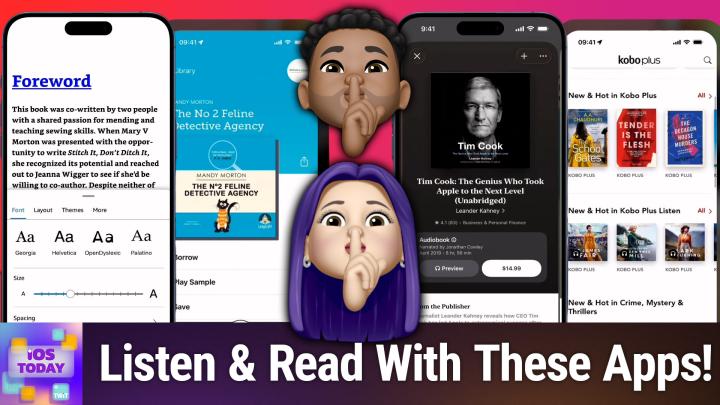
First and foremost, of course is the built in Apple Books app. You can find it by typing, typing in books in Spotlight and that will bring up the Apple Books app. Here is a look at the Apple Books app that has on your kind of main page the set of bestsellers, the 999 collection. This is everything that you have. But you'll notice that I have a section that is probably makes a lot of sense for me, which is a series of the user guides for different devices. So WatchOS 8.6 user guide and I can tap on that to bring up this book and it's going to be very familiar to anyone who uses any kind of book app. It's easy to kind of imagine how this works. You swipe to the left and to the right to go to the next page and learn a little bit about, you know, or read or whatever it is that you want to do.
Mikah Sargent [00:02:57]:
Now this is a PDF that I'm working with here. So that can have an impact on how the content is displayed, but you can do some different things with it, if the, if the item has a table of contents, you can view the table of contents to move to a specific page. It also has search functionality. And then you can set up different themes. So I can change the brightness of my screen, I can increase or decrease the size of the text. I can set up kind of a dark mode or a light mode, I can change how the pages move. So if it's slide as I have or curl, where it does that sort of page curl, fast fade or scroll are the different options. And then you can set up different options for how the text is displayed.
Mikah Sargent [00:03:44]:
Original, quiet, paper, bold, calm and focus. And each of these modes can be customized so that you can change the font that's being used to all the different font options that are available on your device, as well as whether the text is bold. And then you also have some accessibility and layout options like changing the line, spacing the character, spacing the word, spacing the margins, and whether the text is justified that will make a difference to how it is displayed. Now, this app works a whole lot like any other book app, meaning that you can easily look at books that you've purchased before or that you have now. Look, there's the iOS access for all book, for example. And so I can easily read through Shelley Brisbane's iOS Access for all, which has. This is a book that is set up a lot more like what you would expect, what you'd come to expect from a, an actual book as opposed to a PDF. So it's just kind of set up to be easier to read on something as small as an iPhone here.
Mikah Sargent [00:05:01]:
The Apple Books app, as I mentioned, has its store so you can buy books in the store. It's going to have many of the books that you are familiar or that you would like come to expect from any of the, the bookstores. And so there really isn't too many opportunities to like miss out on books because you're getting them from Apple Books versus like Amazon's bookstore or something like that. And it does have a built in audio books section as well. So you can find for example, this book from Leander Kaney Tim Cook, the genius who took Apple to the next level, the unabridged version. You can listen to a preview of it and download as well. Um, and so it is available to you there in the Apple Books app. Anything else you want to say about the Apple Books app, Rosemary?
Rosemary Orchard [00:06:00]:
Uh, I just think it's a great option because in addition to downloading the books there and everything, you can also just put a PDF in you can download an epub and those can go straight into the Apple Books app as well. So, so that you can, you know, enjoy books at any time or, you know, other kinds of media that people have shared with you for long form reading. You could stick all of your manuals for like your washing machine and your oven and things like that in Apple Books if you wanted to. My dad has the manual for his car in his wash in, in his washing machine. No, he has the menu for his car in the Apple Books app because he likes to actually read all of them, but he appreciates the fact that you can actually, you know, zoom in on a PDF version versus a paper version. So, yeah, it's a really great app and I highly recommend that people download it and give it a try because it's free. The books, as always, cost money. Uh, but one of these things with digital books is it depends on where you buy your book as to if it's available, um, and also how much it costs because some books cost more on some platforms than others.
Rosemary Orchard [00:07:00]:
Um, now I personally am a Kobo user. That means I have a physical Kobo device. Actually I have two because I'm that kind nerd. I have the Kobo Ellipsa, the original one, which is the big one with the stylus, and then a Kobo Libra 2, which is a smaller one, which isn't pocket size, but it certainly is handbag size for me. And that's just the, the black and white one. It's not the new Kobo Libre color. But because of that I also have the option of reading books through the Kobo app. So I'm not currently signed in, but you can see that I've recently been reading some books, including some Mechabbit, because, you know, why not relive the nostalgia? But what I really like about this is you can just download your books here, read them and it will sync your progress back to your physical devices as well.
Rosemary Orchard [00:07:53]:
So yeah, it's great to be able to read some of your books. I've just got loads of random stuff here. I have no idea what I've got. But yeah, you can search for books, you can find something, you can search by author and you can get books and audiobooks. Now Kobo, much like Amazon also has Kobo plus, so, so Amazon has Kindle Unlimited where you can have a subscription and get a whole bunch of books or sort of like a library, ish, where you can borrow some books and read them. Kobo has Kobo Plus. Different books are in different systems. So yeah, you get options basically for those.
Rosemary Orchard [00:08:32]:
But yes. So if I were to look for. I've been trying to remember the name of this book for ages and it's called Rani and Suk and it is a Romeo and Juliet story but set in somewhat modern day London and you know, Romeo and Juliet. So it may or may not end tragically, we will find out. But it's got some good ratings and from here I'm not signed in, but I can still add it to my wish list and everything and then I could download, sample and read it and then once I've purchased it I can download it on my phone and just read away. And honestly, I love the fact that the Kobo app allows you to do both audio and ebook as well at the same time. Unlike Amazon, which we will get to in a moment, which has separated those out, which could be good, could be bad, it depends on your preferences. But I like having both in one app.
Mikah Sargent [00:09:26]:
I, yeah, I, I think it is nice to have them both in one app if you can help it. Now, the Amazon Kindle app, of course, as we're kind of talking about, does separate between the two. Part of the reason is that Amazon's audiobook offering is an app that was once a third party company acquired by Amazon and so Audible became an Amazon property and therefore Amazon's audio book offerings are part of the Audible app. The Amazon Kindle app is sort of deep within the, the lore and like lexicon experience. I think of every person, it feels like it's an app that everybody downloads to their iPad or their phone just to kind of have that experience of what it's like to have a book or a series of books with you wherever you go and, and you of course have the sort of Kindle experience on Kindle devices themselves. But what's great about Kindle is that it does provide that syncing, right, that you can sync between your actual physical Kindle and your iPad and your iPhone and all of that can come together and provide your books wherever you happen to be. I think that that is a delightful experience as part of the, if, you know, if you, if you go with, with Kindle and that is where, you know, some people argue, well, Kindle has what, like a stranglehold on the market. But I do think there's a little bit of that Apple, that Apple sort of benefit where when you kind of live in the garden, the walled garden and you're using all of the different devices, they all work very well together.
Mikah Sargent [00:11:32]:
I kind of feel like the Same applies when it comes to Kindle. I know if I buy a book in the Kindle app store, yes, I'm not going to be able to view it outside of Kindle stuff. But for me, as someone who has Kindle stuff, it works for me. But here's kind of a look of it on the iPhone. So I have this book called Stitch It, Don't Ditch it, which is just a book that teaches you about kind of repairing your clothing. And you can see that it is very similar again to the Apple Books app or the Kobo Books app and has the functionality that you would come to expect. A table of contents, search functionality, setting up bookmarks, changing the way that text displays. Now, one cool thing about the Kindle app is that Amazon has developed some custom typefaces specific for reading.
Mikah Sargent [00:12:31]:
So bookerly is its sort of serif typeface that provides what the typographers would argue is a better reading experience. But there's also Amazon Ember Bold, which was created for this, and then a great, a great option called Open Dyslexic, which is an open source typeface for people with dyslexia. It is supposed to and aims to better help people with dyslexia read what they are, you know, what they're, what they're attempting to read helps kind of the brain and the brain process and the eyes properly latch onto the letters. You can change the size, you can change the spacing, you can change the layout. I like that there's this sort of green option for the page color and you can also set up kind of different themes based on the different reading that you do outside of that, again, it's kind of what you would expect from a. What am I trying to say? An ebook. I kept wanting to say audiobook, but an ebook app. One other thing I'll mention is there is a subscription that Kindle has called the Kindle Unlimited Subscription.
Mikah Sargent [00:13:50]:
If you are subscribed to it, you can get a lot of books just as part of the subscription. So I happen to listen to a lot of fantasy audiobooks and occasionally because of the nature of those audiobooks or those titles, they come out pretty regularly. And that means that there's often a period of time where the audiobook has not yet been recorded or edited or whatever, but the book itself is out and I'm ready for the book. So I will head into the Kindle app and start reading it there to kind of have the latest. This again is just a, I think what you would expect from an ebook app. There's nothing. There's not a whole lot more, and there's certainly nothing less than what is available. The flip side of this, of course, is the Audible app, which is Amazon's audiobook offering.
Mikah Sargent [00:14:59]:
And this is, I would argue, more like a podcasts app. And in fact, Audible did recently add podcast functionality to the app experience. So you've got your homepage, you've got your library of books. I'm currently working my way through the cycle of Galland books, and I had started reading them ages ago, and then something else drew me in, and so I wasn't listening to them for a while and then ended up going back. And so now I'm kind of finishing the books there. The Discover page, which has suggestions based on what you would like, but also what people would like. So you can kind of see your authors that you listen to a lot and look through there. The niche topics that I have, like mythical creatures and techno thrillers, I would argue I don't really read a lot of steampunk, but that's for some reason, one of the suggestions.
Mikah Sargent [00:16:02]:
And you can browse by mood. You can see what people are seemingly excited about that's coming out soon. You can see what titles, of course, are on sale. But ultimately for me, that homepage is the best page because it provides, right there, new books, new titles, I should say, from authors that I regularly read and. And also offer suggestions based on the stuff that I have read through. So, you know, if you are, if you liked this title, you'll probably like this title. Now, one thing to bear in mind is that these titles are specifically part of a credit system. And so with it, you.
Mikah Sargent [00:16:54]:
You can buy these books outright, but you can also, I keep saying books, but they're titles. You can buy these titles outright, or you can buy these titles with credits. And so this is an example. If I tap on this book called, this title called Katabasis, if I were to buy it outright, it'd be $17.63. If I wait until I get a credit, then it is for the cost of a credit, which is $14.95 a month. That's my subscription. So typically it's a little bit cheaper to use your credits than it. Or actually, most of the time it's cheaper to use your credits than it is to buy a title.
Mikah Sargent [00:17:34]:
But occasionally there'll be a title that's available for like seven bucks and I'll get that instead that way. So that's a look at kind of the Amazon offerings, anything about that, and then I'd love to hear too. Rosemary, your thoughts on Libby.
Rosemary Orchard [00:17:52]:
One thing I will say about Audible and their subscriptions is cancel every once in a while because they'll give you an offer for 50 off or something like that, or a couple of months free. So it is worth canceling every once in a while. The only thing I'll say before you cancel, you gotta use your credits. Because if you got six credits and then you cancel and you cancel, cancel, cancel, you will lose those six credits. So use your credits asap. Build a wish list. Like I when I am an Audible subscriber, which is probably about six months of the year, I'll just spend an hour at some point going through listening to samples. That is important because some voices I just immediately go, nope, this is not the person I want reading this book.
Rosemary Orchard [00:18:36]:
Thank you very much. Other voices I go, oh my God, I need to find out what other things this person's narrated because they could narrate my shopping list and I would enjoy it. You know, you know, strong white bread, flour or whatever it is, you know, it would be great. So use your credits but cancel and then get three months free or half price or something like that. And then actually cancel at some point if you don't have as much time for listening. But definitely take advantage of their offers when they do that. Um, and also remember, Audible US is not the same as Audible uk. It's not the same as Audible France, etc.
Rosemary Orchard [00:19:07]:
You can end up with multiple subscriptions in multiple countries. That could be good, that could be bad. Just be aware and don't end up being billed across three different countries because you didn't realize they rolled up for subscriptions. Not that I've ever been there. Definitely not me. Nope, wasn't me.
Mikah Sargent [00:19:24]:
Have you heard of Club Twit? Well, here's what it gets. Ad free versions of every show, a feed of bonus content and members only. Shows you won't hear anywhere else. Like my Crafting Corner and Stacey's Book Club. It's the easiest way to support the work we do and stay even closer to the tech community around Twit. Join today at TWiT TV Club. TWiT ready to hear about Libby?
Rosemary Orchard [00:19:47]:
Libby is all about libraries, okay? It is a library app and the whole purpose of Libby the library app is so that it can, you know, help you find library books which are available around you. Now, I'm not actually signed in with my library card at the moment because new phone and I've not done a whole bunch of things with it. I also only recently Picked up my new library card. But once you have geolocated your yourself, it will suggest libraries that are available in your area, which can be really useful for when finding out what other libraries you could go and sign up at to get access to their library books. And so you can see, you know, recommendations by your librarians. So I can see the number two feline detective agency that is immediately going on my list. I am saving that, thank you very much. Yeah, I'll just save that because anything to do with cats and detectives, I am 100% up for, thank you very much.
Rosemary Orchard [00:20:45]:
And so there are a variety of things that you can get on Libby. So you can get books, you can get audiobooks, you can also get magazines, there's kit stuff. And one of the things that I do greatly appreciate about this is the fact that it is curated by librarians and anybody who thinks that being a librarian is an easy job, first of all, it involves dealing with the public, so definitely not an easy job. That is not it. But it is something where it requires a lot of, you know, education and everything to find. Figure out how to do things like appropriately rate books for your library. Because while there may be an age rating on books, that is a general rating for, you know, everywhere, like the entirety of a country, the US for example, pretty big. Even the uk, pretty big.
Rosemary Orchard [00:21:33]:
And rerating things for particular libraries and understanding. Oh, yes, these kids in this particular class, if they're a school librarian, can benefit from this. So I really appreciate the fact that they have things like suggestions for quick reads, reading group suggestions. So books to read as a group of people, you know, themed topics. So at the moment there's a reading well for mental health. I love the fact that it's a well, as though you draw up water or, you know, books in this case to. To help you. And for audiobooks, they have a little headphone icon underneath, at least here in the uk with the number of hours that it shows next to it.
Rosemary Orchard [00:22:09]:
So this is a little AirPods icon. And I can see that Frazzled by Ririwax would take seven hours to listen to. And yeah, now, because this is a library, not everybody can have the same book at once. Sorry, I know it's digital. You would think it works that way. Unfortunately, it does not. But that's okay because you can put yourself in a queue and when that book becomes available, you can download it and listen to it or read it however you like. Now, here in the uk, Libby only works on Kobo.
Rosemary Orchard [00:22:37]:
It does not work on Kindle. If you're looking for physical devices, but the Libby app is of course available on iOS as well. So you can read things on your iPhone or your iPad and progress does sync across those as well. So yes, I've had good experiences with Libby in the past. I don't know about you, Maika, I'm sure everybody's experience, it depends on your local library. If your local library is severely underfunded, then that is going to cause them to not have as many great digital offerings, which is sad. But you know, maybe you can write to your local politicians and complain that they haven't funded a necessary resource for the community.
Mikah Sargent [00:23:13]:
Yeah, I agree, Libby. Fantastic. It is liberating even. And I think that's, you know, part of what makes it pretty magical. My co host on Clockwise and friend Dan Moran, his parents are librarians and so he's a big, big proponent of Libby and kind of really got me interested in it in the first place. It's one of those apps that I think everybody should have on their devices just, just to try it and see, you know, what's available to you in your area. And I think you might be surprised at what's, what's possible there. Moving along now, I do want to briefly mention that if you have an app that you like to use for reading or listening to books, then please do let us know.
Mikah Sargent [00:24:00]:
If it was one that we not mention on the show, you can email us iostodaywit tv Quick little news moment. By now, on Thursday, October 16, 2025, you hopefully will have downloaded the 0.1.0, I should say 0.01 release of the latest operating systems. As Apple has released iOS 26 0.1, Tahoe 26, 0.1 and a few other 0.1 releases. These fixes tend to be or these releases tend to be bug fixes, occasionally security changes, but regardless, this is important as it does help you make sure that you've got kind of all of the stuff, or much of the stuff that Apple has discovered after letting iOS26 out into the wild, that is still kind of going wrong. So if after upgrading to iOS, iOS 26, iPadOS, 26, et cetera, you have noticed some things that are frustrating you, there's a good chance that updating to 0.1 is going to fix that frustration if it's something that's wrong, if it's a bug and not a feature. So now would be your opportunity to head into general software updates and see if there's one waiting for you there to get the latest version. I saw that in the sort of release notes. One of the things that has been updated is it says Wi Fi and Bluetooth may occasionally disconnect on 17 Air and 17 Pro models.
Mikah Sargent [00:25:43]:
That does not surprise me given that Apple's using its own wireless chip for that functionality and so I could very easily see that being a problem. Some people says a small number of iPhone users may be unable to connect to a cell network after updating to iOS 26. That's pretty bad. So glad they've got that figured out. Photos taken under certain lighting conditions with iPhone 17 Air and Pro may include unexpected artifacts. I did not see that in my iPhone review, but if you did, then that's something that you can fix as well. By the way, check out my iPhone review, Twitter TV hot app icons may appear blank after adding a custom tint. And last but not least, voiceover may become disabled for some users after updating to iOS 26.
Mikah Sargent [00:26:34]:
Plus of course security updates. So be sure to get that update if you have not done so yet. Moving along, we've got some feedback that comes in from Thomas. Thomas writes hi Micah, I thought I'd share my experience with my new iPhone Air. Firstly, I'm loving it. I've had the Pro max phones since iPhone 13 and I was getting tired of the size and weight of the phones. There are days with the Air that I I forget it's in my pocket. It's so light.
Mikah Sargent [00:27:02]:
The battery concerns aren't an issue with me since I keep my phone plugged in at my office desk all day. I did that with my 16 Pro Max to the few pictures I've taken with the single camera have been great, although that is still the one aspect I'm still nervous about. Will the single camera be enough? I think it will, but time will tell. Love the show. Thomas from North Carolina. So thank you Thomas for writing in. It's good to hear that so far the camera has not had an impact for you in doing my iPhone review and using that 8x telephoto quite a bit. And also just the bouquet that's available via 4x and 8x is also quite delightful.
Mikah Sargent [00:27:47]:
And yeah, I think I would struggle not having it. But I do think that as a person who regularly has my phone plugged in somewhere or charging in some way, the battery issues would not be something that I have had. And it's interesting, Thomas, you say that and I've heard from other people who have gone into Apple stores and held the iPhone air in their hand and said actually there's something to this. And so I don't know about you, Rosemary, but I'm kind of wondering if I should avoid going into an Apple store and holding it in my head because what if it draws me in and I suddenly feel like Smeagol turning into Golem and I'm holding the phone going my precious and I have to.
Rosemary Orchard [00:28:31]:
Have it instead of my shiny and so pretty. And the color options aren't the brightest, which is sad. No. I would like to try and hold an iPhone Air, but yeah, no, I'm enjoying. I'm enjoying my 17 Pro. I. I didn't go max, I just went 17 Pro. But it's working out really nicely for me.
Rosemary Orchard [00:28:47]:
I used 8 times zoom this weekend and yeah, yeah, it's. It's pretty awesome. So I'm glad I got what I got. But I'm really glad to hear that the iPhone air is working out for Thomas. So if anybody else has bought the iPhone Air, then let us know your thoughts on it. And if you are happy or if you're going to be utilizing that two week free returns period that Apple offer you.
Mikah Sargent [00:29:07]:
Yeah, we'd love to know about that too. Absolutely. All right, I can hear the music. It's time for Shortcuts Corner. This is Shortcuts Corner, the part of the show where you write in with your shortcuts requests and Rosemary Orchard, our shortcuts expert, provides a response. This week's Shortcuts Corner request comes in from Kenny, who writes. Hello Rosemary, I was wondering if there is a way to use the Attention Aware feature in my iPhone 15 Pro that detects whether or not I'm looking at the screen to enable or disable sound notifications. For example, if my screen is unlocke and I'm using my phone, mute notifications.
Mikah Sargent [00:29:56]:
But if I lock the screen and walk away from my phone, the notification sounds are turned on. P.S. i love my Bang case suggested by Rosemary a while back. The extra action button is invaluable. I'd say we've got an automation enthusiast here.
Rosemary Orchard [00:30:14]:
Sounds like yes, we do, which is great to hear and I'm glad that the bank case is working out for you, Kenny. I ended up not purchasing it for my newer iPhones, my 16 Pro and 17 Pro, just because I wanted to try just using the action button and that has worked out pretty well for me. But if anybody needs another action button or they have an iPhone that doesn't have an action button, then the bang case, which has an exclamation mark after the word bang is a great option for Both a case and also bonus action button. However, to Kenny's question, can you use the Attention Aware feature or not? And unfortunately, the answer to that is very simply no. You also can't use whether or not the iPhone is locked or unlocked as a trigger, because this is what we would need to do. We would need a trigger, something that says, hey, when this happens, so hey, when this person is looking at the phone, or hey, when this phone is locked, or hey, when this person stops looking at the phone, or when this person, you know, starts looking at the phone. Problem with starting and stopping looking at the phone, that's. That's something that you do a lot.
Rosemary Orchard [00:31:21]:
So I'm looking at my phone. I'm not looking at my phone, I'm looking at my phone. I'm not looking at my phone. And I don't know about you, Micah, but I look at my phone and then look away from my phone a lot.
Mikah Sargent [00:31:31]:
Yeah.
Rosemary Orchard [00:31:32]:
Like, that would be a huge number of automations. And even if it were limited to only when the iPhone is unlocked, which thanks to shortcuts automations, that would be the case. Unfortunately, there's nothing that we can do here to trigger this. So it's a very cool idea. Unfortunately, it's just not possible to do. And it's a shame because I would also quite like that, particularly if I were to put my phone like face down somewhere, then that should be a signal that everything from that point on should go ding or whatever, unless I'm in a particular focus mode. But unfortunately that's not a trigger I can do either. It's something I can check in an automation, but it's not something that I can just run as a trigger.
Rosemary Orchard [00:32:16]:
So I'm really sad to say, Kenny, this is not an action that's possible. But you know, you can always write to Apple and ask them to add this as just a feature of iOS. That could be an option. I feel like they would be more likely to do that than add Attention Aware, like users currently focusing on iPhone versus users looking away from iPhone as automation triggers. Because I feel like that would absolutely kill your battery life.
Mikah Sargent [00:32:40]:
Very, very. Yeah, that's what I was thinking. The battery life impact would just be immense. So, yes, it doesn't feel like that would be feasible. And especially, you know, poor Thomas with the iPhone air. It's constantly going, are they watching? And they're not watching. And they're watching and they're not watching. Would get a real drain on battery.
Mikah Sargent [00:33:02]:
If you're looking for more Apple coverage, can I invite you to check out MacBreak weekly every Tuesday, they dig into everything happening with the iPhone, with iPad, with Mac. And so, of course, be sure to write in with your own shortcuts. Corner requests. IOS Today at TWiT TV, we are just about to the end of this episode of iOS today, which means now it's time for us to share the part of the show we call App caps. This is where we talk about apps or gadgets we're using now or have been using for some time that we think are wonderful, and we want to share with all of you. The app that I want to mention is it's not, like, the most beautiful app you've ever seen. It is called Reverse Audio. And the reason that I want to talk about it is because it is an app that I downloaded based on something I saw on social media that was cracking me up.
Mikah Sargent [00:34:04]:
And it's a little game you can play with other people. And basically what you do is you either say a phrase or you sing a, you know, a few bars of a song, and then you play it back in reverse for the person that you're playing this game with, the person that you're playing the game with hears it in reverse and then needs to say it or sing it that way into the phone. And then you play it reversed, which would mean that it's actually forward again and see if it matches close. So I could say, let's see. Let's do this. Thanks for watching iOS today. And then I will play that in reverse. That's probably too long.
Mikah Sargent [00:34:58]:
I'm gonna say, thanks for watching. Let me do that. Thanks for watching. And then I'll play in reverse. Huh? Almost as a Klingon. Yeah. Let me do it one more time.
Rosemary Orchard [00:35:18]:
Some kind of Star Trek dialect, for sure.
Mikah Sargent [00:35:20]:
I'm gonna do it one more time. I'm gonna do it slower, and then we'll try to actually make this happen. So let me try it again one more time. I'm gonna say it slower. Thanks for watching. Okay, now I'll play it in reverse, and then I'm gonna do that. I'm gonna hear. Let me hear it one more time.
Mikah Sargent [00:35:42]:
It's not worth. And now we'll try to see if I did it. Here we go. We're playing it in reverse, and we'll see if it sounds anything like. Thanks for watching Fence. You're wonk sing.
Rosemary Orchard [00:36:03]:
That's insane. I love it.
Mikah Sargent [00:36:09]:
So you get the idea. But playing this with someone else, where they hear how they hear, and they try to make those same sounds back to you is pretty funny. So it's, it's like a little goofy thing. I've been told that it's easier with songs for some reason and so try it with, you know, just a few, few moments from a song and see how that goes. Yeah, playing Taboo or charades with it would be a lot of fun. But this, this app, it's called Reverse Audio there because this was a trend. This was part of the reason why I got it is because since it's a trend, there are a lot of different apps right now in the app store that are all trying to be reverse audio. And so you may end up getting one that is trying to get a lot of money from you.
Mikah Sargent [00:36:56]:
And so it's got like a weekly subscription, all that kind of stuff. The one that I have, it has an in app purchase, a one time in app purchase to disable ads and otherwise you can use it for free with ads. So specifically look for the link in the show notes to the reverse audio app that we have. All right, that's mine. Roseberry. What is yours?
Rosemary Orchard [00:37:19]:
Mine is an oldie but a goodie and it's part of Apple Arcade. Now this is Threes plus. Now specifically if you have an Apple Arcade subscription, look for the one with the plus at the end of it in the app Store because that is the one that is part of Apple Arcade. So to play threes you need to try to merge numbers to make threes or multiples of three. So for example, I have a one and a two in the top right. I'm just going to swipe towards the right and that merges those together. Now I'm going to swipe down to try and merge some of those threes. Swipe right to merge more threes.
Rosemary Orchard [00:37:51]:
And I'm now going to try and swipe to just merge as many of these numbers as possible. This is probably going to get quite messy quite quickly because I'm also trying to talk about the app whilst I am doing things with the app. So this is probably going to go off the rails quite quickly and everything will go horribly wrong and I will lose badly. And I mean at this point I can't lose. I will get points because I have made numbers. But the higher the number you make, the more points you get. So you know, points mean prizes in theory. Points do not mean prizes in this game.
Rosemary Orchard [00:38:23]:
Points mean that you did better than you previously did. Woo. Ghost Sports. But yes, I, yeah, I'm out of moves because I was not really concentrating on this. But now I can swipe to see my score or tap and it will add up all of the numbers that are threes or multiples of three. And so I got 156. That is not as good as my score earlier when I was playing this for nostalgia purposes and got 512, I was quite proud of myself there.
Mikah Sargent [00:38:51]:
That is great.
Rosemary Orchard [00:38:52]:
Yeah, yeah, I, I512 was a really good score. I was very happy with that. So, yeah, you swipe to save it. But yeah, I've got some decent. Sorry, 516, even better. And then I got 420 and then 156. But yeah, you can toggle on night colors, which is, you know, nicer at night. There's sound effects and there's music and if you go back to the main menu, then you can also, when you first open the app, there's a tutorial that explains how to play this.
Rosemary Orchard [00:39:20]:
But basically you swipe up, you swipe down, you swipe left, you swipe right, you add 1 plus 2 to get 3 and then 3, then you match like numbers together and that's it. It's very simple. It's quite addictive. It's an easy game to play and it's just one that I'm going to be keeping reinstalled on my phone so that if I am at a plane or just on a plane or just waiting somewhere for a while, I've got a little piece of free entertainment that I can play offline. No ads and for as long as my heart desires.
Mikah Sargent [00:39:50]:
Lovely. We love an app. I mean an ad free experience there, you know, nice not pay as you pay to play experience as well, which can kind of get obnoxious at times. Anyway, that is the end of this episode of iOS today. I want to remind you all about our wonderful club offerings. Twit TV Club Twit is where you go to become a member of the club. It is very easy to do so at TWiT TV Club TWiT. $10 a month, $120 a year.
Mikah Sargent [00:40:22]:
When you join the club, you gain access to some awesome benefits. Every single one of our shows ad free. Just the content. You also gain access to to our special feeds that are available to club members, including our live coverage of different tech news events. We publish special shows that we have in the club. So my crafting corner, we also have Stacy's Book Club. We have like coffee, chats and camera or photo time and all sorts of fun stuff as well as access to like bits, clips, special moments that you won't find anywhere else. And with that you also get access to the members only Discord Server.
Mikah Sargent [00:41:04]:
A fun place to go to chat with your fellow Club Twit members and those of us here at TWiT. If all of that sounds good to you, TWiT TV Club Excuse me, If all that sounds good to you, Twit TV Club Twit is where you go as I mentioned before, or if I failed to mention it does start with a two week free trial, so it's great opportunity to check it out, see if it's for you. I think you'll want to stick around and we would love to have you there. Rosemary Orchard if people would like to follow you online and check out all the great work you're doing, where should they go to do so?
Rosemary Orchard [00:41:35]:
Well, the best place is rosemary orchard.com which has got links to apps, books, podcasts and many more things, including social media sites. But the one social media does not mention is that club To Discord. Because we hang out there during the shows as we're recording. Sometimes there are funny jokes, sometimes people make really helpful comments, comments which then make it into the show. But either way it's a great time. Plus there's a great place to hang out after the show in the iOS today forum. Micah where can folks find you?
Mikah Sargent [00:42:02]:
If you're looking to follow me online, I'm ikasargent on many a social media network. Or you can head to Chihuahua Coffee that's C H I H O A H O A dot Coffee where I've got links to the places I'm most active online. Thank you so much for tuning in. We'll be back again next week with another episode of iOS today. Bye bye.
Rosemary Orchard [00:42:19]:
Goodbye folks.