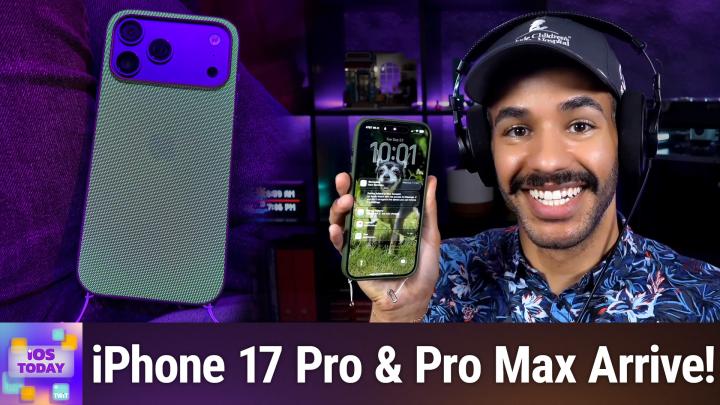
iOS Today 771 Transcript
Please be advised this transcript is AI-generated and may not be word for word. Time codes refer to the approximate times in the ad-supported version of the show.
Mikah Sargent [00:00:00]:
Coming up on iOS today, Rosemary Orchard and I, Micah Sargent, have our iPhones and that means it's time to talk about them today on, well, iOS today. Stay tuned.
Rosemary Orchard [00:00:14]:
Podcasts you love from people you trust.
Mikah Sargent [00:00:18]:
This is twit. This is iOS Today, episode 771 with Rosemary Orchard and me, Micah Sargent. Recorded Tuesday, September 2020 23rd, 2025 for Thursday, September 25th, 2025. Hands on with the new iPhone. Hello and welcome to iOS today. This is the show where we talk all things iOS, iPados, WatchOS and other OSes. It's a great time to talk about the Apple tech in our world and help you all make the most of the Apple tech in yours. I am one of your hosts.
Mikah Sargent [00:01:01]:
My name is is Maika Sargent.
Rosemary Orchard [00:01:04]:
And my name is Rosemary Orchard. And I'm very excited to be hands on with all the new shiny goodies.
Mikah Sargent [00:01:11]:
Yes, indeed. So as you all likely know, Apple did recently announce and then proceed to launch its new set of phones and watches, and in at least one case, AirPods. And this is now our opportunity after getting these phones on launch day, to get to talk about them here on iOS today. So I would love to hear first and foremost. Well, actually I'll start and then I would love to hear your story of getting your phone. So for me, my preorder I think I mentioned on the show originally was scheduled to be delivered I think sometime earlier this week. And that obviously was not great because that's past launch day and I wanted to be able to get it on launch day. Well, I got a message from Apple not too long after my pre order that said, hey, by the way, your phone will arrive to you on launch day.
Mikah Sargent [00:02:19]:
So throughout the day I was waiting, listening for the rumble of the, of the UPS truck and finally the UPS truck arrived. It was nighttime and I went outside and outside waiting for me was my, actually it was two boxes because one were my new AirPods Pro and the other was my new iPhone. I of course immediately brought it down to my office, had everything set up and started to do recording of an unboxing and you know, opened it up and pretty much very quickly slapped on the case for my new iPhone 17 Pro Max in the deep blue color. So yeah, I was excited to get it on launch day even though it was launch evening for me. Rosemary, did you have a deliver? Did you pick it up? What was your experience like?
Rosemary Orchard [00:03:22]:
I had mine delivered. So for me, I don't know if this happened with everybody else either, but the Apple Store app just said preparing to ship until Very late on Thursday, then eventually ticked over to shipped on the Thursday around about, I want to say lunchtime. And it feels like it should have been earlier because I am 100 aware that my iPhone was somewhere underway before then because it didn't magically teleport out of China into my hands or into the hands of dhl, who are my delivery people. But yeah, I eventually got a DHL tracking number and then I got a window say it's coming between 11:34 and 12:34. At around about 11:45 in the morning, my iPhone showed up and was delivered into my hand. What I did find slightly interesting, and I'm curious if this was the case for you as well, Micah. I was delivered a brown envelope. Inside the brown envelope was a brown box, and inside the brown box was my white iPhone box.
Rosemary Orchard [00:04:25]:
And it felt a little bit like one of those kids games that they play at parties where you like, you pass the parcel around and then when somebody stops the music, you get to take off a layer of wrapping paper and there might be something inside of it, or maybe there isn't. And then they just. You just have to keep going and you hope that you get something cool out of it. It felt a little bit like that. But I only had the one parcel and unfortunately I had to get going shortly after that. So I didn't immediately set it up. I put it in my bag, along with my Spigen phone screen protector and the case that I had pre ordered, which was my app cap last week on iOS today. And so I popped those in my bag and went off.
Rosemary Orchard [00:05:06]:
And then I was able to set it up later in the day. But it was a pretty smooth setup process. It did take a little while, but these things always do if you have a lot of data on your phone, and I'm. I'm one of those people, I'm afraid I have a lot of data on my phone. So it took a little while, but I did the whichever option it showed me was the fastest, which I think was phone to phone. And that finished downloading everything else through icloud and that worked out pretty well for me. So I got set up and running very quickly.
Mikah Sargent [00:05:34]:
Yeah, so that's actually what I did as well when it came. So mine came in this box, a cardboard box, and inside of the cardboard box was the white box that was my iPhone and then another box, and this is a cardboard box and then some kind of like crinkly paper to keep it all held. This box is because this will be the turn for my 16 Pro Max as I don't have family members close by to and also technically I don't own the phone because it is provided by work. So all of those lead to me not passing along the phone and therefore the old one goes back. So that's the case in this case, which is why my box is that way. But speaking specifically of the setup process, yes, I needed to get to the phone as quick as possible, obviously for being able to do my kind of first impressions review of the iPhone. And so that is out now for everybody to check out. It went out as on hands on tech.
Mikah Sargent [00:06:48]:
So you can see my initial thoughts after using it for a couple of days that went out on Sunday, I got it on Friday nights and talk about the crossbody strap, the tech woven case and a bunch of other stuff. And so because of that I needed to set it up from an icloud backup because I knew I would be able to get access to it quicker. Then after I was done with that process, I did reset it and do it with the handy feature that lets you use a USB C cable between the two phones. And because I have had the Pro, because I had the Pro and because I have the Pro, those USB C speeds are quite fast. And so the process I would say took about an hour to transfer. Transfer over quite a few apps, mostly audiobook files, I'm sure were a big part of that and some other stuff that kind of got transferred between the two. So once I got it all set up, immediately began using it. And one of the things that I noticed first, Roseberry, the vapor cooling and the aluminum unibody.
Mikah Sargent [00:07:56]:
There must be something to that because for me, oh yeah, my phone did not get as hot as I'm used to it getting during the initial setup process.
Rosemary Orchard [00:08:06]:
Yes, same here. I usually keep my Razer cooler on hand. So that's just a MagSafe cooler that can plug in and it mag saves to the back of your iPhone and then it just cools your phone and if you, you take it off and you touch it, it feels really cold, like icy cold. And so I actually forgot to take that with me. And it was so going, oh no, my phone's going to get really warm. It's not great for it. And then also it will end up throttling itself if it gets really warm, which is not good. You don't want your phone to throttle itself because it's basically saying like I'm getting too warm, I'm gonna slow down doing what I'm doing so that I Don't, you know, put.
Rosemary Orchard [00:08:43]:
Basically make myself even hotter by trying to do things faster. It's like if you're running in the sun, you're better off actually walking instead of running. Um, but yeah, it didn't get that hot and I've been using it all day and I, it's not hot. It's, it's like it's a comfortable temperature to hold. I pick it up and it's not cold like a block of ice, but it's not hot. And yeah, I found that my, my 16 pro definitely got a little too warm for comfort at times.
Mikah Sargent [00:09:11]:
I will say I did. There was one listener who tuned in on Sunday who did have an overheat notification on their new phone. So it's, you know, your mileage may vary but overall it's been my experience and experience from others that I've spoken to that it is overall running cooler. One of the things that I am testing, I've got an IR thermometer, you know, one of those that sort of has like the trigger on it. And I'm putting the 16 Pro Max and the 17 Pro Max through some of the same tasks like using Apple intelligence features and seeing the difference in the overall temperature between the two devices. Now with this new phone of course comes a suite of 48 megapixel lenses. And that's kind of one of the biggest wonderful things about the 17 Pro Max is having those three lenses, one that does the 8x optical zoom. And I have been, I have been impressed with the cameras thus far.
Mikah Sargent [00:10:20]:
Again, you know, there hasn't been a lot of time to, to use them but in the use cases that I've had, both in near darkness and you know, sort of action shots, it's taking the photos quickly. They look good. Video has been quite impressive, continues to be quite impressive. And I do have to say that square sensor on the front of the cam, on the front of the phone is quite a great idea. Not having to turn my phone to the side to take what one would call a group selfie. Although that could argue arguably just be called a photograph is very smart. I think Apple made the right choice there in terms of kind of leaning into the front facing camera being a very popular camera. I've also seen lots of great feedback from folks who have been using the new feature that lets you capture sort of in picture, in picture your reaction and experience to something that's going on.
Mikah Sargent [00:11:30]:
And you do that by allowing for not just capture but visually view of the front facing camera and the back facing Camera at the same time. And I think that's going to end up being a pretty popular feature for sure. I can just imagine my niece, they're both long past this now, but let's just say when my niece was first learning to walk, getting a call from my sister, and not only seeing my niece take her first few steps, but also seeing my sister's reaction, the mom of watching their child take their first few steps, I think that's going to be very popular. So I am looking forward to seeing how people make use of that. And that'll be something that, you know, we. We continue to cover. Overall, I would love to know, Rosemary, for you, was there anything that when you. You pulled it out of the box and you started to play around with it, that not necessarily surprised you, but that you found yourself going, oh, I really like this.
Mikah Sargent [00:12:40]:
Or maybe it's, oh, I thought I was gonna like this, but I don't like this. Anything that kind of stuck out.
Rosemary Orchard [00:12:47]:
Well, the first thing that stuck out obviously was actually the back of the phone, because this 17 Pro, I mean, it's not. I mean, the camera obviously is actually sticking out, and that feels different, but it's in a good way. But I really like the. The ceramic part that's right here that just. It feels nice. I can, if I like, really try to feel where the ceramic meets the aluminium, because these are aluminium phones, not titanium. But it just feels smooth and comfortable to hold. And I.
Rosemary Orchard [00:13:24]:
It's one of those things where I then immediately took the case off of my 16 Pro and tried to identify the difference. And all I can say is it feels nicer in the hand without a case on. Don't ask me why, don't ask me how. There is some level of magic to this I am unable to actually put into words, but I am. Yeah, I really like the way that I can hold it. I'm also enjoying the fact that the ceramic, it feels a little easier to clean maybe, but, yeah, the pop socket works just as well as it did previously. Feels perhaps a little bit firmer now on there. It's a little more difficult to, like, just pop it off by accident, but it's still easy enough should you want to.
Rosemary Orchard [00:14:06]:
But yeah, I'm also. What I'm really looking forward to seeing, though, with this is this is another generation of phone with the camera button on, with the action button on. And I have a feeling that as this filters down to people, more and more people are going to find new uses for it. This was actually a really good opportunity for me to go into the settings for the camera because I realized that sometimes I press the camera button on my phone and it doesn't do anything and there is a very simple reason for that. I had the it turned off for when the the camera was face down. So if you go to settings camera camera control then you can turn off requiring the screen to be on on your phone because if your phone is like in your pocket or it's face down then the screen well in this case it's on but it will turn off but then you know you can actually have it so that then when you press your camera button it goes straight to the camera which you know I, I like that I haven't unfortunately having been ill for most of the weekend I have not had the opportunity to go out and play with the lenses as I wanted to. But you know from my my tiny little bit of playing with them the eight times optical zoom seems really useful. It did allow me to inspect the condition of my keyboard and I will not be showing those pictures on air because everyone will think that I am a disgusting person despite the fact that I have cleaned my keyboard recently.
Rosemary Orchard [00:15:28]:
So yes but it is, it's. It's good to have all that there and yeah I'm looking forward to giving my dad a phone with the camera control button and seeing how he uses it.
Mikah Sargent [00:15:39]:
Yeah I will say I. I think this is going to be the phone for me that camera control really locks in. I did not use it that much in my previous phone but it there if a. I've now had it long enough to where just in my mind I'm going okay that feature is there fixing what we just talked about big part of it as well knowing that you just need to go in and for me enabling that feature that makes it so that you can access camera you know while the phone screen is off or locked or what have you dimmed. It does make a difference and again given the There are a couple of things that I think are going to come together to make this more of something that I do. One thing that I wanted to talk about is this new feature that we have that makes it so you can not new feature but new option that you have which is the crossbody strap. Now I understand that some people might find this to be a little bit goofy. There were certainly initial reactions about it being a pretty goofy thing and I get that but I have been.
Mikah Sargent [00:17:04]:
I went ahead and got the crossbody strap because it was important for me to kind of try out if Apple's Going to create a new accessory, then the company clearly sees a reason to do so. And so I want to see the reason for why this exists. Right. So I did get the crossbody strap and by the way, very difficult to put into the case, which is both good and bad. I had to use a semijector tool to inject the little strings that tie at the bottom of this case. This is Apple's tech woven case and it has spots, whoops. For the, the lanyard kind of attachments. But my point is, by having this on a crossbody strap and carrying it around like as a sash, my phone is so much more accessible than it typically is when it's in my pocket or in my bag.
Mikah Sargent [00:17:59]:
And that has made it where I go, oh, let me just pull this up real quick and take a photo. And why is it so easy for me to take a photo? Camera control, bada bing, bada boom. I've suddenly got this great, you know, camera that is at my side. Of course, I got it in the matching color. And one thing that I want to say about the crossbody strap, it's so Apple. The. So when you look at the strap, it bends the way that you would expect, sort of across the horizontal plane. Right.
Mikah Sargent [00:18:30]:
That's the part that, you know, you putting around you, but it doesn't quite as much quite as easily bend the other way across sort of the vertical plane. And, and the reason why it is this way is because Apple has lined this strap with magnets so that you don't have that issue of those two strap pieces kind of coming undone and kind of annoyingly moving about and readjusting it makes it very easy to adjust how long the strap is and then not have a bunch of open space with the strap because it just snaps into place thanks to those alignment magnets that are built into the crossbody. Now one other thing is an added benefit that I hadn't even considered is that this case, when I take off, because it's very easy, there's just these little snaps and when I take off the crossbody, right. And just leave the little lanyard attachments at the bottom, I've got a built in fidget toy. Yeah, that's quite delightful. So I could just play around with these little attachments down at the bottom. And then just the other day I was talking to a friend of the show, Mike Hurley. Well, I wasn't talking to Mike, but Mike had mentioned that it almost looks like my phone has legs.
Mikah Sargent [00:19:48]:
And so now it's just this adorable little phone that has these tiny little legs that it's running away on. So that's how I'm feeling about the crossbody strap that I once thought was super dorky. And I don't. I still don't know 100% how I feel about it, but I do like that it makes my camera more accessible and for me, more front of mind. I'm very forgetful about the fact that I have this great camera and that, yes, yes, it's great to sort of live in the moment and yada, yada, yada, but it's also kind of nice sometimes to have some memories to look back on. And I'm so bad about taking photos. And so now I have this kind of easy thing that I can go, oh, right, it's around my, my body and I'm gonna snap a photo. So I'm liking it.
Mikah Sargent [00:20:41]:
I am liking it.
Rosemary Orchard [00:20:44]:
I'm glad to hear that, Micah, because I previously had the mouse cases, and the mouse cases have lanyard attachment points on either side, and then there's an optional crossbody strap that you can purchase. And I found that having the little lanyard points on the side, first of all, slightly drove me crazy when I wasn't using the lanyard, and secondly, the side points, I don't know, maybe I just got a bad lanyard or something. But, like, where I fed the actual, the, the actual lanyard, like the tiny baby parts basically of it, through which I also had to do the sim ejector tool. By the way, that's a really great tip. If people are trying to feed like a little, very tiny string of a lanyard through one of those very small holes. A SIM ejector tool is. Is brilliant for this. Yeah, I found that it was.
Rosemary Orchard [00:21:32]:
It started fraying on one side and that concerned me a little bit. So I will actually be taking a closer look at the Apple cases, in particular the tech woven. I tried touching the fine woven previously and it was a little bit like nails going down a chalkboard for me. I just, I touched it and went, no, not for me, thank you very much. I. I will pass on this particular option, which is a shame, because I would have loved to have liked it as their altern relative to leather. But I think tech woven apparently is well worth looking into. So, yeah, definitely something to explore.
Rosemary Orchard [00:22:08]:
And speaking of accessories, I have not got AirPods Pro 3 yet, though. I was thinking of it, but there are quite a few cases and other things available for the AirPods. But I found it interesting this year that the OtterBox cases were not available on the Apple Store. Usually Otterbox and Apple Pair to provide iPhone cases immediately available at launch. But this year they had the Beats cases, including the Beats case with the kickstand as part of a sort of wristband lanyard. And by all accounts, and from several reviews I've seen, that's actually a really great case. So I may actually have to go into an Apple Store and have a play with one of those as well as picking up an iPhone air to have a look at it at some point because I'd like to hold an iPhone air in my hand just to see what I'm missing out on. But yeah, I do love sticking my iPhone on lanyard, especially because not all women's clothing has pockets, which is frustrating.
Rosemary Orchard [00:23:08]:
When I am there in the kitchen and doing something, it's like, ah, if only I had my phone to look up this thing. I end up asking my homepod and Siri's getting a lot better. But yeah, it's nice to have your phone all lanyard for those moments elements.
Mikah Sargent [00:23:24]:
I also think the tech woven case itself is quite a delight. It is. So as Rosemary was talking about, the texture of the fine woven definitely different from the tech woven. The tech woven, I kind of described it as. It's almost like carpeting, fine woven, high pile sort of shag carpeting. This is a much finer sort of what am I looking for? A like landlord special carpet but. But still high quality. And so there's a little bit of give to it but not much.
Mikah Sargent [00:24:01]:
And it doesn't feel kind of like the, the loops or the hooks on a hook and loop fastener. It's far more connected. I also, it was just by chance and let me see if I can get this shared over quick enough. I'm trying to think of where to go to get this. Just by chance, I was at a restaurant here in Portland and if there's one thing Portland loves, it's spooky season. And so this restaurant, even though we're not yet to October, has already turned into like a spooky version of itself. Which means that there's a. There was a black light.
Mikah Sargent [00:24:43]:
Well, several black lights. And I've just shared in our iOS today chat, Kevin. I'm also sharing in the discord, but just by chance I looked down and the it's kind of cool. The green fibers within the case are blacklight reactive and so you get this really cool glowing effect from, from the case which was kind of nifty. And I, I'm not sure if that's going to be the same with the other colors. But I do know my. Our dear friend Patrick Delahanty is going to look into that for the other. But obviously not incredibly important, but I thought it was cool.
Mikah Sargent [00:25:26]:
Another thing that I wanted to mention, Apple did say that they refined the buttons on the tech woven case from the buttons of last year. I like the buttons from last year more. They, they stick out more than these do. And so for me, I found it easier to kind of move my finger to where it needed to be and feel along without necessarily having to touch that spot and that it's just a little bit more difficult to, you know, move your finger along and find where you're. Where, where something is. So I guess it just depends on your definition of refinement. For me, I kind of saw it as a step back. But yeah, that's the tech woven case and the kind of crossbody strap comparison there.
Mikah Sargent [00:26:20]:
Now, of course, along with all of this, Apple, as it always does, if it's going to bring out a new phone, is improve upon the processing power of this device. And this phone is no slouch. Absolutely a very powerful device. But what I find and why I don't typically put so much focus on this chip has this and this. And this is because it just. We need to talk about the impact, right, that it has on the individual user and what they will most likely notice or not notice. And I think one of the first things I saw with this phone when I started using it was it was just the slightest bit more responsive than even my iPhone 16 Pro Max of last year. I remember during the setup process, and particularly after the setup process as I'm launching apps and kind of playing around with things, swiping around and seeing the animations, that liquid glass is just the tiny, tiny, tiniest bit more responsive.
Mikah Sargent [00:27:36]:
And it's not something that you can really quantify, but you can certainly just. You just feel it and it just feels a little bit more zippy. And honestly, I found that quite nice as well. The other big thing when it comes to performance improvements is battery life. And this phone is supposed to be able to get far more than a day of video viewing. I am a person who is around different chargers throughout my day most of the time. So I don't usually run up against any battery issues. But I am looking forward to.
Mikah Sargent [00:28:21]:
We'll get to it, I think next episode. Someone who's very much focused on battery life. And I think that for the people who are away from chargers or don't want to charge their phone a lot throughout the day. This could be the one that you want to go for, certainly over the air. Yeah, I'm really loving the performance of this phone.
Rosemary Orchard [00:28:47]:
Yeah. So I didn't charge my phone last night. I actually completely just forgot. Series of errors happened and because I was ill, I forgot to charge my phone. And I did use it a chunk yesterday. And I woke up this morning, it was on about 50% battery. I used wireless CarPlay to drive home. That took me about an hour.
Rosemary Orchard [00:29:07]:
And then when I got home it was down to 40 something percent. I popped it on charge for maybe an hour or so. And this was on a slow MagSafe charger, not a fast one. And now it's at 68% and I'm doing pretty well, I have to say. I'd say slow MagSafe charger. I think it's a 15 watt one rather than the, the newest 25 volt ones which you can get. So, you know, it wasn't super slow, but it wasn't super speedy either. I certainly didn't actually physically plug my phone in, but that is a, you know, that's just really nice that the battery is doing so well.
Rosemary Orchard [00:29:43]:
Speaking of plugging the phone in, one of the things that I was kicking myself when I remembered that this was a thing that I could have done and I didn't do is between the iPhone 16 Pro and the iPhone 17 Pro, you could plug a Thunderbolt 4 cable in between the two of them to set up the new devices and transfer the data. I have now ordered a Thunderbolt 4 cable which I am going to have to label. And my plan is to use one of those metallic sharpies to label this cable so that I know that it is a Thunderbolt 4, because otherwise it just looks like a USB C to USB C cable. And yeah, there's that important. Maybe, maybe not. But yes, if you have a Thunderbolt 4 cable, then you can plug that into the two devices to transfer over the data for setting it up. And that is obviously a lot speedier than doing things wirelessly because, you know, wirelessly they have to create their networks and everything and you know, connect themselves together and set everything up. But if you plug it in, then it just goes over the very, very, very speedy cable.
Rosemary Orchard [00:30:46]:
So definitely worth considering. I found an Amazon Basics one for about $10 online. So worth considering adding that to your arsenal because also it's just useful to have a Thunderbolt 4 cable around once you've got devices that are capable of it.
Mikah Sargent [00:31:01]:
Absolutely. Anything else that we, that you. Or I guess I'll answer it too. Anything else we want to say about the new iPhones as we have just had the opportunity to kind of start. Start really putting it through its paces, testing it out. Do you have any regrets about your color choice, your. Your capacity choice, anything like that? Or maybe you. You are regretting that you didn't go with the air instead.
Rosemary Orchard [00:31:34]:
Personally, no, I don't have any regrets, especially due to the fact that I had my iPhone down every year, so my dad will be getting this one next year. If I'd bought the air, I would never hear the end of it, literally. Probably because eight times optical zoom, my dad wants that in his pocket about yesterday and he's getting five times optical zoom tomorrow, so, you know, he'll have to live with that. But no, I feel like this is a great phone. It's very comfortable in the hand, it's easy to use, which, you know, is not a surprise. I've already been using the software as you mentioned, Micah. The liquid glass does feel a bit zippier, which is just a nice bonus. But yeah, I got the, the nice dark blue and it is a really nice color.
Rosemary Orchard [00:32:17]:
I love it. Orange, which would have been interesting, but it's not really me. And white, I don't know, I just feel like it would end up looking grubby all the time. I just spend loads of time carrying around glasses cleaning material and using it to clean my phone instead of my glasses. And quite frankly, if I'm going to bother to carry around glasses cleaning material, I should probably do that for my actual glasses instead of an iPhone. So, yeah, no, I'm pretty happy with the dark blue 512 gigabyte one. What about you, Micah?
Mikah Sargent [00:32:44]:
I'm very happy with mine as well. Again, 512 iPhone 17 Pro Max Blue. It's exactly what I need in terms of storage capacity. It's exactly what I want in terms of feature set. And I, yeah, I have. I have no regrets about it. I think it's a. It's going to be a great phone.
Mikah Sargent [00:33:06]:
I love how it looks. I really like how it feels too. There's something to be said for that unibody enclosure. The fact that I don't the edges of it, even though now it's in a case, but when I had mine out of the case, the edges of it are so smooth. Smooth in comparison to the even just last year's model of the iPhone. So I think that is even enough for me to be like, yeah, this thing just feels really right. In the hand. And yeah, I think Apple genuinely feel like they knocked it out of the park with this phone.
Mikah Sargent [00:33:43]:
We'll continue to see kind of how that plays out. I did just also upgrade. For the longest time, I've not needed more. I still don't technically need more than a Wi Fi 6 router, but I just upgraded to one of the, I upgraded one of the routers in the home, the one that's closest to here, to a Wi Fi 7 router. And so that will also be something that I'm kind of testing as we check out Apple's own wireless chips and look at what that provides. So lots more to say about the iPhone over time as we continue to use these. And as I always say, we'd love to hear about your experience with the, with the new phones. Which, which phone did you get? Which, which phone did you, are you thinking about getting? If you are looking for advice on which one to choose, all that kind of stuff, we'd love to hear more about that.
Mikah Sargent [00:34:42]:
But oh, the way that you get in touch iOS today at Twitter TV. All right, with that, it is time to move on to the new news. We've got one little news mentioned here. Apple, as we record this on September 23rd, has put out a little press release in its newsroom talking about a project looking to help the California redwood forest. So Apple has a restore fund and has been investing in two dozen conservation and regenerative agriculture projects across six continents since 2020, the most recent of which is an investment in the redwood forest in California. Of course, we know that the redwood forests are sort of hand in hand with what California is. Lisa Jackson, who's Apple's vice president of environment policy and social initiatives, said, we're thrilled to help protect California's iconic coastal redwoods as the of part part of our growing Restore fund initiative. You know, something kind of neat about redwoods, they're one of the only trees that get a sizable amount of the water that they take in from humidity in the air.
Mikah Sargent [00:36:07]:
Most other trees, almost all other trees get it by way of roots, which is how many plants work. Sort of non tree plants work as well. But redwoods, they suck that up through the air. Even other coniferous trees often do not do this. So it's kind of a unique thing to redwoods that, you know, it seems like they've adapted over time to the humid environment that's there along the coast, which I think is super cool. So the idea here is to invest in nature based carbon removal. That's the whole point of this by looking at at helping trees and restoring forests, then you are allowing for these trees and plants to absorb more of the carbon in the air, which then is able to help to offset the carbon output of the company. By 2030, Apple and its suppliers aim to remove 9.6 million metric tons of carbon from the atmosphere annually through these different projects.
Mikah Sargent [00:37:17]:
So very cool. Very. There's this video of them measuring tree diameter and height. And there's this guy wearing a cool vest that's like full of stuff and it pulls out an iPad. I want to be that guy. That's so cool. I want a vest. Anyway.
Mikah Sargent [00:37:38]:
Super, super cool. You can read more about it at the link in our Show Notes. Okay, okay. With that, let's move on to the feedback segment. This week's Feedback. By the way, if you have feedback, questions, comments, concerns, whatever that you'd like to send our way, you can email us iOS Today with TV Doug writes in hi, Regarding the calendar episode that ran Thursday 9 11, do you, Rosemary comma Micah comma or Dan include tasks in your calendars? If you use Omnifocus, for example, do you keep tasks separate and switch between the Omnifocus calendar and Fantastical calendar? Or are they together and you simply turn on or off a task calendar? Sincerely, Doug so I'll answer first what my experience is and then yes, I'd love to hear Rosemary yours as well. So quickly. Just to remind everyone, recently I was out and the wonderful Dan Morin stepped in to record some episodes with Rosemary and one of the episodes they talked about calendars and this is a more modern feature, but it totally makes sense that it's a feature that should be part of calendars, which is including tasks as part of the calendaring experience so that you can kind of tie tasks to specific days and then mark them done and see, you know, when you've completed them.
Mikah Sargent [00:38:59]:
I am not a task manager person at all. I use my calendar day in, day out all the time, but I do not do tasks. If I ever do, they're written and like physically written and they have to be big so that I look at them over and over again. So because of that, no, I do not have my tasks tied to my calendar because I just don't do any task management app. But I do know that, Rosemary, you are a bit of a task management expert, so I am curious about your experience.
Rosemary Orchard [00:39:40]:
So I personally have the feature enabled in Omnifocus where you can show calendar events because this in conjunction with one of the latest features that came to omnifocus of planned date is exceptionally useful for me going, hey, so I've just planned to do 24 hours of tasks on Tuesday. I look at Tuesday and I see my 24 hours of plan tasks and I also see that I'm recording hours today. I have balanced ballet and also I have a job. And then I realized that maybe I can plan to do 24 hours of tasks in a day, but I can't actually do 24 hours of tasks a day. Maybe I should plan to do some of those on other days. So yeah, I actually have omnifocus show me my calendars. So the way that that works is it you choose which calendars to have it show you and then you can either say, would you like, like to see your calendar first as in above everything else? Or I have that turned off. And this means that for example, if I have a doctor's appointment at 8am and I have a task due at 10am and then I have a meeting at 1pm and then I have a task due at 4pm, it will show me doctor's appointment, task, meeting, task, blah blah, blah, blah blah.
Rosemary Orchard [00:40:54]:
And it interweaves the meetings and the tasks for me. So I can see things in the order that they are due. So, so, which is also quite useful because I heavily use task management. So if I have something that I need to do before a particular meeting, it will have a due time of about 30 minutes before that meeting. Um, and then I can see. Ah, yes, no, this thing that I said that I needed to do is actually genuinely very important because there is a thing that will require me to have done this. Um, so yes, I personally have it turned on. Uh, I don't use reminders as much.
Rosemary Orchard [00:41:26]:
I use reminders exclusively for location based reminders which are generally things like I'm getting into or out of the car or when I arrive home because I like the fact that they pop up on my lock screen as individual tasks and just stay there. So for example, when I got home today, I needed to feed my sourdough starter and then I needed to make some sourdough bread. And that is exactly what I did. And I now have a loaf proofing in the fridge, which is very exciting because it's, it means that tomorrow I will have fresh bread. And it's also, yeah, that's how I use my, my task management system. It involves multiple applications. But yes, calendars are an integral part of that for me.
Mikah Sargent [00:42:05]:
There you go, Doug. And with that, it is time for us to talk about Our app caps. These are apps or devices or gadgets that we think or accessories that we think are great that we want to share with all of you. You. I spent a lot of time talking about it during the show so I won't go into too much detail but I am very pleased with Apple's iPhone Tech woven case. I have talked a lot in the past about this case that I had on my 16 Pro Max from Otterbox. It is a cactus leather case and it comes in green and I really, really liked it. It was, it's super premium.
Mikah Sargent [00:42:48]:
The cactus leather feels good. I like that it's this two tone green color and so I was kind of worried that I wouldn't be able to find a case that I liked for this year's iPhone. So far I'm loving the color, the feel, the, the, the, the look. This blue and green together. Oh everything about this 17 pro max and of course the fact that that because I've got the crossbody strap that matches which I love a matchy match means that it looks like it has little legs on it which is fun as well. So I am very, very, very happy with this. It is, let me remember the price of it. It is $59.
Mikah Sargent [00:43:32]:
So yeah, you can get that directly from, from Apple. Rosemary, tell us about your app gaming cap.
Rosemary Orchard [00:43:40]:
So my app cap is something I have mentioned on the show before and it's an oldie bit of goodie because Spigen make these every single year and that is their glass tr easy fit iPhone screen protectors. Now they actually make these for a whole bunch of devices and I am just going to open up the box so you do, just to be clear, you don't get one in here, you get two and you get a bit more than the screen protector. And I kept the one that I've already used just so that I can show folks how it works essentially. So I have my screen protector here on my iPhone. You can't see it. There are no bubbles. It's brilliant. So essentially what they, they send you is they send you everything that you need.
Rosemary Orchard [00:44:25]:
So there's a little cleaning kit, there is the actual device device to apply the screen protector and then there is the screen protector within said device and then a little sort of squeegee based thing. So what you do is you clean your phone screen, very simple. And then you grab your phone and you grab your screen protector holder because it comes in this sort of plastic shell and you just pop the two of them together. Together. It's very simple. And then you press from, oh, I'll switch, switch that around. You press from the middle, you slide outwards, then you wait 30 seconds, you don't have to press on it during that time. And then you lift up from here.
Rosemary Orchard [00:45:11]:
I did forget to mention there is a little tab that you pull out the bottom. And then after you've waited for your 30 seconds, you lift the whole thing off and at that point almost certainly you will have no air bubbles left. Now, now, for the first time in I want to say four years of using these screen protectors, I had a few little bubbles. So I used the squeegee that it comes with, which has got lovely little bit of foam on the end to try and get rid of the bubbles and they mostly went away. And then I just left it. I left it alone. I did not pick it up to try and lift it to get the bubbles out because that will 100% guarantee that you get a little piece of dust or fluff, or in my case, dog hair stuck under your phone screen protector. And you do not want that.
Rosemary Orchard [00:45:55]:
So I did that and I waited it and now I have no bubbles on my phone screen at all. And these screen protectors are very easy to apply. It's $20 for two of them. So you basically you just pop one on your phone, you don't realize it's there most of the time you forget that it exists. And if you damage the screen protector, you've got a second one. And because it comes with the stuff to install it, it's so easy to do without getting a horrible mess of bubbles on your screen. So I highly recommend those. The Spigen screen protectors I just got tempered glass.
Rosemary Orchard [00:46:29]:
They also do privacy ones and a few others. So whatever your preference is, you can have a great screen protector on your phone and it's really easy to install without messing it up.
Mikah Sargent [00:46:41]:
There you go. All right, that brings us to the end of this episode of iOS today. I want to remind you all out there listening, if you would like to be a member of Club Twit, you would. I promise when you become a member of Club Twit, you are going to get some awesome things to become a member. I'll talk about those in a minute. Head to Twit TV Club Twit. $10 a month, $120 a year gets you access to some great benefits. Ad free content.
Mikah Sargent [00:47:09]:
You get these custom feeds, they've got your name in them that are just for you. These custom feeds for all the shows are ad free versions of all of the Shows you also gain access to several feeds that you wouldn't get as a non club member that include bits and clips. Also our live news events. So whenever there's a table tech news event we do sort of live commentary in the Discord. Leo and I recently covered the Apple event, the Made by Google event. Leo covered the Meta event. All of that's available to you as a as a member of Club Twit and the other feed which includes our Twit shows that we do in the club. So that includes things like my crafting corner that include which by the way is tomorrow this month it also includes Stacy's book club.
Mikah Sargent [00:48:05]:
So much more available to you. Next month we're going to be doing I'm going to be running a D and D adventure. Very excited about that. So all of that in the club and then access to the members only Discord server. A fun place to go to chat with your fellow Club Twitt members and those of us here at TWiT. It's a great time and we would love to see you join. By the way, there's no reason not to join because there's a two week free trial to kick things off. So you know, give it a go.
Mikah Sargent [00:48:31]:
I think you'll end up loving it and you'll stick around and we will celebrate your entry to the club. With that it is time to say goodbye. Rosemary Orchard if people are looking to follow you online and check out all the great work you're doing, where should they go to do so?
Rosemary Orchard [00:48:49]:
The best place to go is rosemarychard.com which has got links to apps, books, podcasts and all the social media sites where you can find me as well. Plus you can also find me in the clubtour Discord where people chat during the show. I and so some people are talking about Maika wanting a green case. Utterly outrageous. We would never have expected that from Micah. Uh, okay, that was me. Um, but yes it's, it's great to interact with listeners during the live show recordings or if people have got feedback after a show then they can also drop those into our show specific areas. Maika, where can people find you?
Mikah Sargent [00:49:21]:
If you're looking to follow me online, I'm at Micah Sargent on many a social media network or you can head to Chihuahua Coffee. C H I H U A H U A Coffee where I've got links to the places I'm most active online. Now I'm to going going to update that page when you hear this on Thursday. If you go to Chihuahua Coffee you'll see at the top a link that will take you to something very important that's happening this Friday. So you might notice that I am wearing. It's not there yet. I'm going to update it so that it's there. But you might see that I am wearing if you're watching a hat that says St.
Mikah Sargent [00:49:53]:
Jude Children's Research Hospital, St. Jude does some really awesome work. They basically make it so that kids who are diagnosed with catastrophic disease, including cancer, that they and their families do not have to pay a single cent to receive treatment. And so this Friday I'm going to be running a DND campaign to raise money for St. Jude Children's Research Hospital. Basically what will happen is you donate and your donations will impact the game live. So if you want to see me kind of of quickly try to rewrite the story for the the players that we have, then that is a way that you can not only, you know, go with some shenanigans, but also help St. Jude continue the life saving work that they do.
Mikah Sargent [00:50:46]:
If you're listening to this, we're recording it. We'll be doing it Friday from 5pm to what is that? My time, 5pm to 9pm Pacific. But there is, you'll see again on the site. So that'll be this Friday, 5pm to 9pm Pacific. An epic high level adventure raising money for St. Jude Children's Research Hospital. So please head there Chihuahua Coffee to learn more and I'd love to see you there in the feeds donating impacting the game and more importantly, impacting the life of children not just in the U.S. but all around the world.
Mikah Sargent [00:51:28]:
So thank you for that. Thank you for checking, tuning in. We'll catch you again next week. Bye bye.
TWiT.tv [00:51:36]:
From Silicon Valley boardrooms to tomorrow's AI breakthroughs, if you need to keep up to date with tech, you need TWiT TV. At TWiT, we are tech experts who understand what's happening and can keep you in the loop. And we do it in a thoughtful, informed and fun way. Start your Sundays with this Week in Tech, a roundtable of tech journey journalists and people in the know with a rundown of the week's most important tech news. But that's not all. All week long you can stay ahead of security threats with Steve Gibson and Security. Now, keep up on all things Apple with MacBreak Weekly. Listen to the most informed Microsoft experts in the world with Paul Thurat and Richard Campbell on Windows Weekly.
TWiT.tv [00:52:16]:
Our flagship shows feature tech's most respected voices, giving you the insight you need to understand, understand and benefit from the changing world of technology. We give you analysis you won't find anywhere else so you can make smarter business decisions and take advantage of the technologies transforming your world. Whether you're a CEO, IT professional, or simply passionate about technology, TWiT's network of shows gives you the edge you need in today's digital landscape. Don't miss a minute. Subscribe to TWiT TV today.