Hands-On Apple 231 transcript
Please be advised that this transcript is AI-generated and may not be word-for-word. Time codes refer to the approximate times in the ad-free version of the show.
Mikah Sargent [00:00:00]:
Coming up on Hands on Apple, it's time to talk about a really cool AI feature in Apple Music that you may have missed. Stay tuned, podcasts you love from people you trust. This is Twit. Hello and welcome to Hands on Apple. I am Micah Sargent and today we are taking a look at an Apple Music feature that I, apparently a lot of people haven't heard about. It's been out now for a while and it is something that I have used a bit and I thought, well, after talking to three, four different people who hadn't heard of this feature, it was time to, to talk about, well, Apple Music Playlist Playground. So let's head over to ipados and take a look. All right, here we are on ipados and this is an Apple Music feature that of course requires an Apple Music subscription, it requires access to the Internet and it requires an Apple ID that is ages 13 or up.
Mikah Sargent [00:01:19]:
Once you have all of those things, then you are able to make use of this feature. So even on older devices, if you've got that online access, then you're able to create a Playlist playground. Now, what is Playlist Playground? You can think of it as a way to tell Apple Music what kind of music you want to listen to and have it create a playlist for you. This is different from what we've come to expect with talking to Siri on a home pod and saying play some music that I'll like for dinner where up to this point it has essentially looked for playlists that exist that have some of those keywords or it will do a playlist based on your previous listening and make something that will play through based on again your, your interests. But Playlist Playground from the outset is a way to craft playlists using simple phrases and descriptions. So let's take a look at how that's done with Apple Music launched here on this iPad. We're going go to our playlists section and you can see that there's already a playlist here called Friendly Barbecue Playlist. Now that is a playlist that is shared with my my account.
Mikah Sargent [00:02:41]:
This of course is the Micah Twit account. And in order to create a playlist, all we need to do is go up to the top right corner of Apple Music. Now, depending on which device you're on, this is an iPad, but on the Mac on your iPhone, look for the plus icon. We'll tap on that and choose the Create new Playlist feature up first. You see that you are prompted with giving the playlist a title and adding songs. But there's a new experience again running in beta right now called Playlist Playground that lets you create a playlist based on what you want to hear. We're going to take a look at how this works right after we take a quick break. As you may recall, we are taking a look at Playlist Playground, an AI based feature that allows for playlist generation.
Mikah Sargent [00:03:34]:
Now I want to go ahead and show you the classic way to create a playlist. We could give this playlist a title and let's say this is our House Cleaning Jams playlist. And the first thing that we can do is scroll down and we can look at suggested songs. These are songs that Apple Music is suggesting adding to a new playlist based on stuff that I have listened to before and stuff that I may want to listen to based on my current tastes. This is not, I stress not the way to use Apple Music's new playlist Playground. That's what we've been used to up to this point. You can add songs that way, but what we want want to do is actually create a playlist that's based on that. So for house cleaning jams, I'm going to say upbeat cleaning.
Mikah Sargent [00:04:36]:
Jams that are familiar and hit enter. Now remember, the idea here is that you can type in what you want and it's going to a process what you're saying in plain language and then use that to create songs or rather a playlist that you can, can have. So here you'll see that it after I type that in at the top left it says this playlist brings upbeat vibes from familiar tunes, perfect for lifting spirits and energizing moments. And when I look through it I'm seeing, yeah, a few songs I know and many of these are songs that I would be familiar with and some of them are songs that maybe I wouldn't want. So I can easily just like a normal playlist, swipe to remove that song or tap on the three lines to bring it up. For example, I don't want One Direction in my playlist. I don't want Jonas Brothers in my playlist. I don't definitely don't want Meghan Trainor in my playlist.
Mikah Sargent [00:05:50]:
Not really a big fan of old Taylor Swift either. And for now we'll leave that as it is. But what we can do is in the quick actions section we can actually have it add more songs. And it does this based again on the playlist that you already created. So what you wanted it to be, which again was this sort of up beat familiar music playlist and it'll look at the playlist as it exists right now. It will then determine what songs would make it sound good. So now there are 31 songs, as opposed to just the 25 that we started with. And I can go through.
Mikah Sargent [00:06:30]:
And oh, look, it re added that Meghan Trainor song, it re added that Jonas Brothers song, and it added a new Taylor Swift song. Now, the little dot next to the three lines shows you what new songs were added. And what's cool about this is you'll notice that they were added not just at the end. They weren't tacked on the end. No, they were added within the playlist. And that's because it's not just a playlist that is built on having songs that you would be familiar with in this case, but it's also a playlist that's built on what songs would sound good one after another. From here, we can do what we're used to, which is hitting those three dots, and see that this has the ability to once again add songs, but select so that if you have multiple songs that you really don't want on this playlist, you choose those. You can hit the trash can icon, or you can also choose to select all of the songs at once.
Mikah Sargent [00:07:27]:
We'll cancel that because we're good here with this playlist. House cleaning, jams. And now what I want to do is create one more playlist just so you can get an idea of how this might look. Depending on your own sort of set of interests and your set of music listening. You'll notice that it also creates a cool little background for this album that is a playlist. But album art for this playlist, we'll choose create new playlist once again. And this time we're going to say, well, and I love this too. There's a new playlist idea.
Mikah Sargent [00:08:05]:
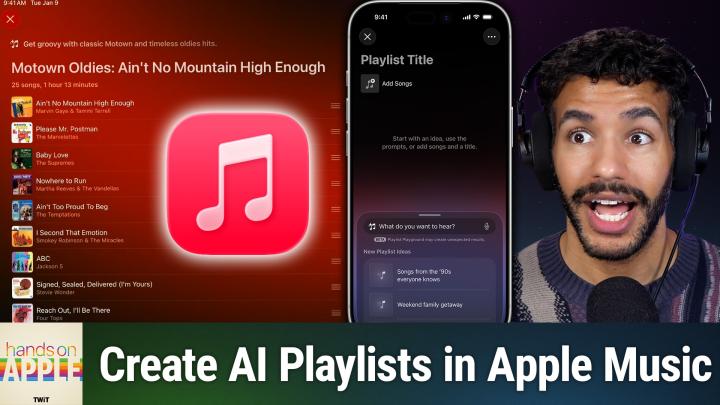
Most famous guitar solos ever. Disco songs that define the 1970s and songs for the after party. What I want is golden oldies with Motown vibes. And we'll do a search for that and see what Playlist Playground creates. So again, searching for songs and also determining what I'm actually looking for so that it can provide feedback of what I'm after. So it says, get groovy with classic Motown and timeless oldies hits. And my favorite part is if you don't put in a playlist title, it'll go ahead and generate one for you. So it's called Motown Oldies Ain't no Mountain High Enough.
Mikah Sargent [00:08:53]:
It starts, of course, with the Ain't no Mountain High Enough song goes into please, Mr. Postman. Which is good baby Love. Yes. Nowhere to run. I bet if I listen to that I'd remember it. Oh yeah, actually I just remembered it. That's funny.
Mikah Sargent [00:09:07]:
Ain't too proud to beg love. And I second that emotion from Smokey Robinson. Very good. The Jackson 5. Look at this. This is a great playlist. Again, it's organized, it would think a playlist should be. And remember that choosing to add music, you can do your own additions by looking for songs, tapping that add songs button at the bottom there in the bottom left hand corner.
Mikah Sargent [00:09:35]:
But another way to kind of update this playlist is to choose add more songs where again it'll add them throughout or refresh playlist which will give you a new set of songs to go along with. So I'm going to go ahead and call this good. I'll check mark and it will add this to my playlists. Now if at any time I want to, I can go in and choose the Edit option which will allow me to create a new photo or use one of these auto generated album covers that are available within Apple Music. So if I hit the icon for the photo library, then of course it will head into the photo library, but there are lots of options here and so we're going to go with one that's already created Motown Oldies Ain't no Mountain High Enough, with a sort of CD in the background. You can also have it set so that it will show on your profile so other people who are on Apple Music who follow you will be able to see this or not. And from here you can remove or add songs from the playlist. So I'll hit checkbox to basically only change the look of the album cover and leave everything else alone.
Mikah Sargent [00:10:51]:
And at any time, just like you've always been able to do with Apple Music, you can add other people to become collaborators and treat this just like any other playlist that already works. The one thing I would suggest that you might consider doing is hitting going to your playlist, hitting the plus sign and choose and creating a folder, then typing in Playlist Playground. And that way you can always keep track of which of your playlists are created by Apple Music's Playlist Playground. So a quick recap here. Playlist Playground is an AI feature with Apple Music that allows you to automatically generate playlists based on plain language phrasing. So you type in what you want. A cleaning playlist for a rainy afternoon, a calm playlist for studying calc, and then it will generate a playlist for you making changes to the playlist and then choosing to add more songs will adjust the filters based on that and you can get to something that works just for you. The ability to have it automatically generate a playlist that not only has the music that you're interested in, but also is cognizant of how the playlist actually moves is something that I feel is incredibly important when it comes to creating playlists that traditionally these features may have lacked.
Mikah Sargent [00:12:35]:
So taking it one step further of actually going in and making the the the not just the duration but the order important, I think is something that's really cool about this new feature. So if you are looking for new music suggestions or wanting to find music that you've, you know, not listened to in a long time, or whatever it happens to be, Playlist Playground just might be the choice for you. You just need an Apple Music subscription, an account where Your age is 13 or older, and access to the Internet. Thank you so much for tuning in to this week's episode of Hands on Apple. As always, it is a pleasure to bring you this show each week and I'll be back again next week with another episode. Goodbye.