How to Use iPhone Focus Modes and Sleep Tracking for Better Rest
AI-generated, human-reviewed.
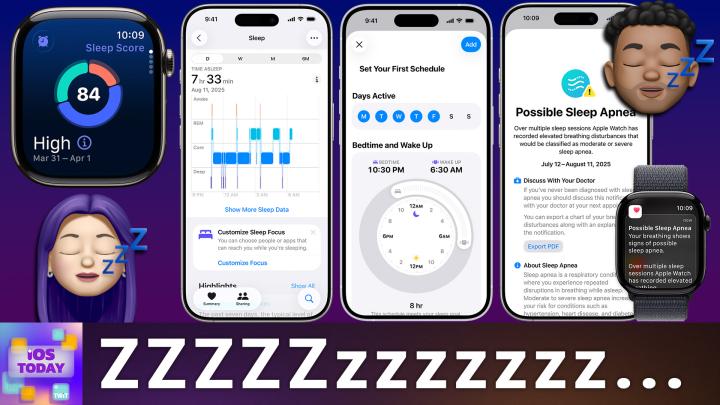
Using your iPhone and Apple Watch for better sleep isn’t just about tracking hours — it’s about creating an environment that supports real rest. On iOS Today, Rosemary Orchard highlighted the best ways to use built-in Focus modes, automation, and top-rated apps to help you sleep better, wake easier, and manage notifications smartly.
Why Focus and Sleep Tools on iPhone Matter
Sleep is essential, but digital distractions and erratic schedules interfere with getting enough quality rest. Since Apple has built powerful sleep support features right into iOS and the Apple Watch, there’s no need to install extra gadgets or make complicated changes.
iOS Today focused on how anyone can use these features, from setting sleep goals to automating routines, minimizing interruptions, and even detecting sleep apnea.
Setting Up iPhone Sleep Tracking and Focus Modes
- Sleep Tracking With Apple Watch and iPhone:
- Go to the Health app on your iPhone to set a sleep goal and schedule your sleep and wake times.
- Wear your Apple Watch to bed to automatically track sleep duration, interruptions, and quality.
- The system records consistent bedtime and wake times, helping you form healthy habits.
- Using Sleep Focus Mode:
- In Settings, tap Focus to access and customize the built-in Sleep Focus.
- Sleep Focus mutes unwanted notifications automatically at bedtime, but you can allow calls from favorites or set exceptions for emergencies.
- Link Sleep Focus with your bedtime schedule for seamless activation.
- Customizing Sleep Focus:
- Choose which people and apps can contact you during sleep.
- Adjust home and lock screens for minimal distractions (for example, a dark theme, only necessary widgets).
- Use filters to set your device in Dark Mode while sleeping and turn on Low Power Mode to save battery.
- Automate HomeKit devices like bedroom lights or thermostats to adjust with your sleep routine.
Automating Your Sleep and Wake Routine
On iOS Today, Rosemary Orchard demonstrated how automations enhance sleep routines:
- Use Shortcuts to trigger actions when going to bed or waking (e.g., dim lights, get weather updates, disable alarms remotely).
- Integrate with third-party apps or smart home assistants to further customize (like using the Signal app to flash bedroom lights as an anti-snooze measure).
- Personalize routines for shift work or travel by linking Focus modes to locations or Wi-Fi networks.
Best Third-Party Sleep Apps (2026)
If you want more data or smarter alarms, consider these top picks discussed on the episode:
- AutoSleep ($8.99 one-time): The highest-rated paid app for deep sleep tracking, automatic integration with Apple Health, and detection of sleep apnea risk and breathing disturbances.
- Sleep Cycle Tracker and Sounds (Free w/ in-app purchases): Uses your phone’s microphone or accelerometer for sleep tracking and offers smart alarms to wake you in the lightest sleep phase. Most features require an annual premium ($57.99).
- Pillow Sleep Tracker (Free w/ in-app purchases): Works across iPhone, iPad, and Apple Watch, processes audio data on-device, and is highly recommended for shift workers. Premium subscriptions run up to $40/year.
All these apps sync with Apple Health, ensuring continuity across platforms.
Living the Dream
- Sleep Focus lets you schedule, automate, and protect your sleep with granular controls and zero cost.
- Apple Watch or iPhone (no accessories required) can provide accurate sleep data, scoring you on duration, consistency, and interruptions.
- Severe snoring or breathing disturbances are now flagged, offering a path to catch signs of sleep apnea early.
- Third-party apps fill gaps for advanced tracking or shift-worker routines but may carry additional costs.
- Automation through Shortcuts and HomeKit lets you tailor the experience to your environment and routine, further reducing friction between bedtime and optimal rest.
Anyone with a recent iPhone and Apple Watch can access world-class sleep tools without spending extra. By taking a few minutes to set up Sleep Focus and sleep tracking, you lay the foundation for better health and more energized mornings. For those needing extra features or working non-standard shifts, premium apps like AutoSleep or Pillow provide massive value. And for smart home users, integrating automations for lights, alarms, or even weather updates upon waking can transform your relationship with sleep.
Sleep Focus and Apple’s Health features offer robust, free, and customizable solutions for improving your sleep quality. Coupled with automation and carefully vetted third-party apps, you can turn your iPhone and Apple Watch into personal wellness assistants that work quietly in the background while you rest. Find what works for you, experiment with Focus settings, and don’t overlook the power of automating small steps in your nightly and morning routines.
Listen to the full episode for detailed tips and more expert recommendations:
Subscribe: https://twit.tv/shows/ios-today/episodes/815