How to Use iOS 26’s New Messages Features: Backgrounds, Polls, & Smarter Filtering
AI-generated, human-reviewed.
The iOS 26 update brings a wave of practical upgrades to the Messages app, letting users set custom conversation backgrounds, conduct in-chat polls, and manage unknown senders with new filtering tools. These features make texting more personal, interactive, and organized without needing extra apps or workarounds.
What's New in iOS 26 Messages?
On Hands-On Apple, host Mikah Sargent explored the most noticeable changes users encounter right after updating to iOS 26, focusing on key enhancements in the Messages app. Here’s what stands out:
Custom Conversation Backgrounds
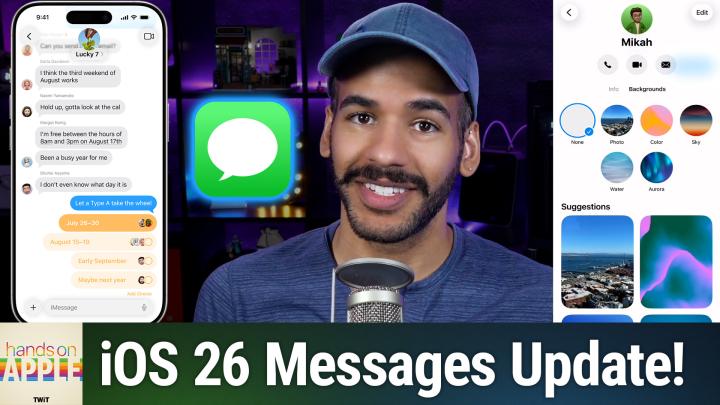
The biggest visual upgrade is the ability to set backgrounds for individual message threads.
- How it works: Open a conversation, tap the contact’s name, and choose the new “Backgrounds” option.
- Customize with: Any photo from your library, a palette of preset color themes (like Mango, Plum, Deep Sea, Aurora), or gradients such as sunrise, dusk, and haze.
- Advanced options: When selecting a photo, apply styles like black and white, duotone, or color wash, similar to lock screen customization.
- Toggle on/off: If you prefer a cleaner look, you can disable conversation backgrounds for all threads with a simple switch in Messages settings.
This feature lets each chat feel distinct, great for personalizing family threads, group chats, or important contacts.
Built-In Group Polls
Making group decisions just got easier. The new Polls tool is now integrated directly into iMessage.
- Start a new poll by tapping the “+” icon in any conversation and selecting “Polls.”
- Add multiple options (e.g., restaurant choices) and a poll question.
- Anyone in the group can vote, and the results are updated in real time.
- Long-press to view who voted for what, ensuring transparency.
Previously, users needed third-party apps for polls. With iOS 26, it’s seamless and secure right within Messages.
Smarter Filtering and Unknown Senders
Spam and verification codes are easier to manage thanks to new sorting options:
- Screen Unknown Senders: Found in Messages settings, this toggle hides notifications from unknown numbers and moves such messages to a separate list, cutting down on distractions.
- Time-Sensitive Messages: Allows important alerts (like verification codes) to still reach you, so you don’t miss critical notifications.
- Built-in Filters: The filter button in Messages now sorts chats by standard messages, unknown senders, suspected spam, and recently deleted. This makes it easy to find important conversations or check for missed alerts.
On Hands-On Apple, Mikah noted how these updates made his inbox more manageable and reduced unwanted interruptions without blocking genuine messages.
How To Use These Features
Setting a Conversation Background:
- Open Messages and tap a chat.
- Tap the contact’s name (or group name) at the top.
- Tap the arrow, then select “Backgrounds.”
- Choose from presets or upload a photo; apply style filters as needed.
- Confirm your choice; the background updates instantly.
Creating a Poll in Messages:
- In a group conversation, tap the “+” icon.
- Choose “Polls.”
- Add a question and options.
- Send the poll and watch the group vote live.
Managing Unknown Senders and Spam:
- Go to Settings > Apps > Messages.
- Enable “Screen Unknown Senders” to send unknown messages to their own filter.
- Allow time-sensitive notifications to get important codes or alerts.
- Use the filter button in Messages to quickly switch views.
Major Upgrades
- Personalize: Assign custom backgrounds to conversations for a more fun and organized experience.
- Collaborate: Use built-in polls to simplify group decisions without third-party tools.
- Control: Take back your inbox with better spam/unknown sender filters while keeping crucial notifications accessible.
These features are available to anyone running iOS 26, which you can get by updating your iPhone now. No extra app downloads needed. If you message frequently, especially in groups or professional chats, these updates make iOS 26 a meaningful upgrade. Beyond aesthetics, the filtering and poll features help streamline daily communication and reduce hassle from spam or constant alerts. For those juggling lots of contacts or conversations, Messages is now a more effective hub, offering visual organization and actionable tools you can set up in a few taps.
Why iOS 26 Matters For Texting
iOS 26 makes the Messages app more personal, organized, and interactive. With custom backgrounds, embedded polls, and advanced inbox management, you can communicate better, whether you’re decorating a chat, making a group choice, or just cutting down the noise.
Stay updated on more tips and deep dives: Subscribe to Hands-On Apple at https://twit.tv/shows/hands-on-apple/episodes/200